
Kubeadapt
How it Works
Book a demoSign inStart free
Start free
All releases
v25.10.10feat·Oct 10, 2025(8mo ago)

Abandoned Workloads Detection

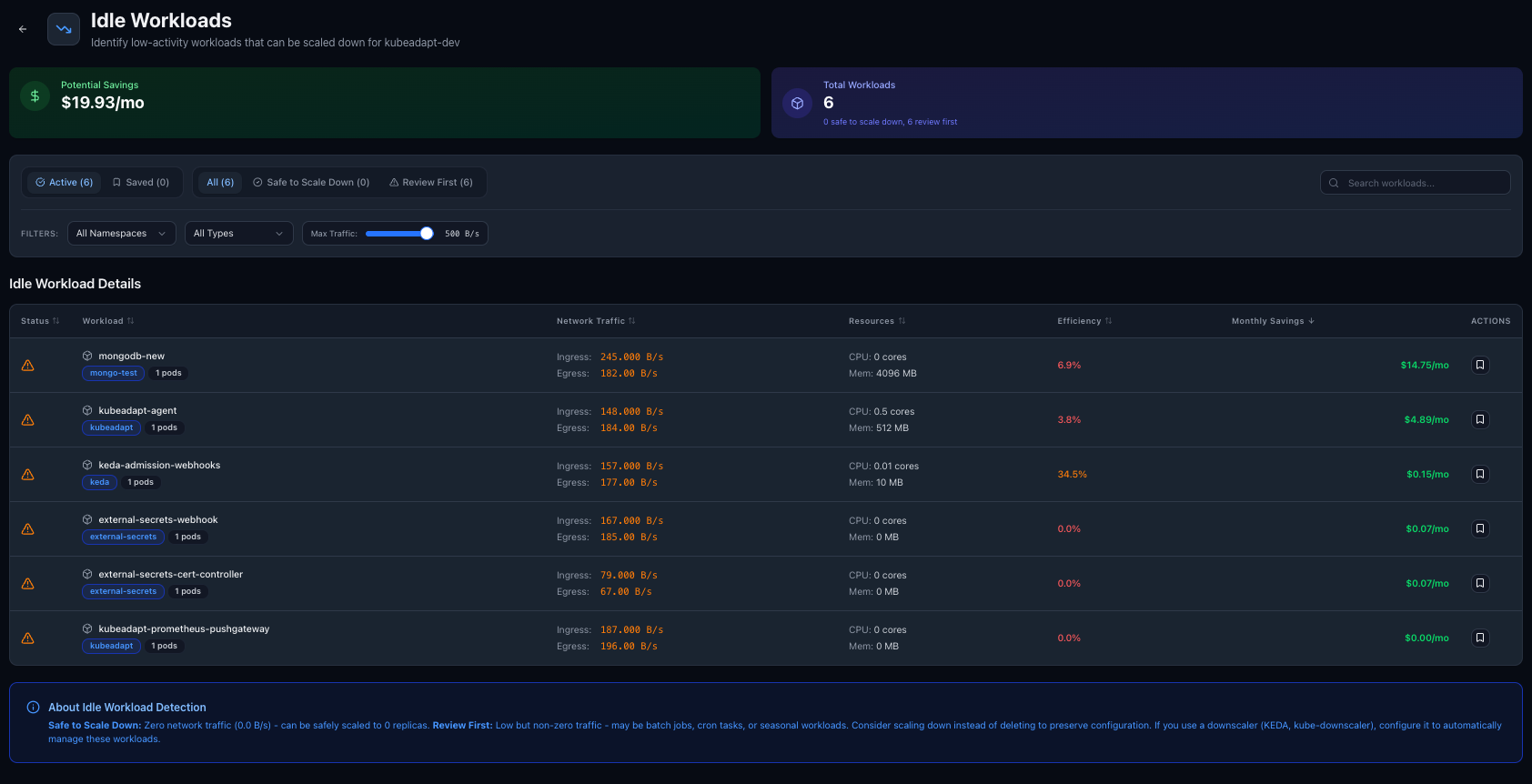
Find workloads with zero or near-zero utilization sitting idle in your cluster. See what they cost and decide whether to scale down or remove them.

Shipped by

  • Ugurcan CaykaraUgurcan Caykara
  • workloads
  • cost-optimization
  • automation

Idle workloads are invisible cost

Dev environments, test deployments, proof-of-concept services, forgotten cron jobs. They request resources, the scheduler reserves capacity, and you pay for it. But nobody is using them.

Kubeadapt now detects workloads with minimal or no activity and surfaces them so you can clean up.

How detection works

The analyzer looks for workloads that show consistently low utilization across both compute and network dimensions:

  • CPU and memory usage near zero over the lookback period
  • Network activity below a configurable threshold (inbound and outbound)
  • No recent scaling events or deployments

A workload that requests 500m CPU but uses 2m and receives no network traffic for a week is likely abandoned. The analyzer flags it with an estimated monthly cost so you can prioritize cleanup.

When a flagged workload is deleted or scaled to zero, the detection clears automatically on the next agent snapshot.

<!-- callout:note -->

What you see

Each abandoned workload shows:

  • Current resource requests vs. actual usage
  • Network activity level
  • Monthly cost of keeping it running
  • How long it has been idle

How to use it

Go to Available Savings in your cluster and click Manage abandoned workloads. The list is sorted by cost impact. You can adjust the network activity threshold in page preferences to tune sensitivity.

Newer release
v25.10.24featOct 24, 2025
Orphaned Resources CleanupFind PersistentVolumes that are no longer attached to any workload and see how much they cost. Clean up storage waste you didn't know existed.

More releases

See all
  • v26.03.16feat

    Automatic Updates for the Kubeadapt Agent

    A sidecar that checks for safe chart versions, runs version upgrades, and reports the result back to the dashboard.

    Mar 16, 2026

  • v26.03.09feat

    AWS Savings Plans & Reserved Instance Attribution

    Connect your AWS account and see RI/SP discounts reflected in your actual cluster costs instead of on-demand rates.

    Mar 9, 2026

  • v25.12.05feat

    Capacity Planning: Right-Size Your Infrastructure

    Visualize node group utilization, identify oversized infrastructure, and run what-if scenarios for instance type changes, spot ratios, and Graviton migration.

    Dec 5, 2025

Kubeadapt

Kubernetes FinOps platform. Cost visibility, rightsizing, and capacity planning that pays for itself in 30 days.

Product

  • Cost Monitoring
  • Cost Attribution
  • Workload Rightsizing
  • Recommendations
  • Smart Alerting
  • Best Practices
  • Network Cross-AZ

Resources

  • Documentation
  • Status Page
  • Feature Requests

Company

  • About Us
  • Security
  • Careers
  • Contact

© 2026 Kubeadapt. All rights reserved.

PrivacyTermsSecurity