CAST AI is a SaaS platform for Kubernetes automation. Its controllers replace the node autoscaler, pick instance types, manage spot capacity with fallback to on-demand, and rightsize workloads, including in-place on Kubernetes 1.33 and later. Cost monitoring is free and serves as the entry point. Kubeadapt does a different job: it allocates cost precisely and recommends changes, without changing anything itself.
The short version
- Choose CAST AI if you want a vendor to optimise the cluster continuously and are comfortable giving its controllers permission to change nodes and pods on the major public clouds.
- Choose Kubeadapt if you want precise allocation and showback, recommendations that go through your own review, and carbon and FOCUS reporting, with no controller acting on the cluster.
Feature checklist
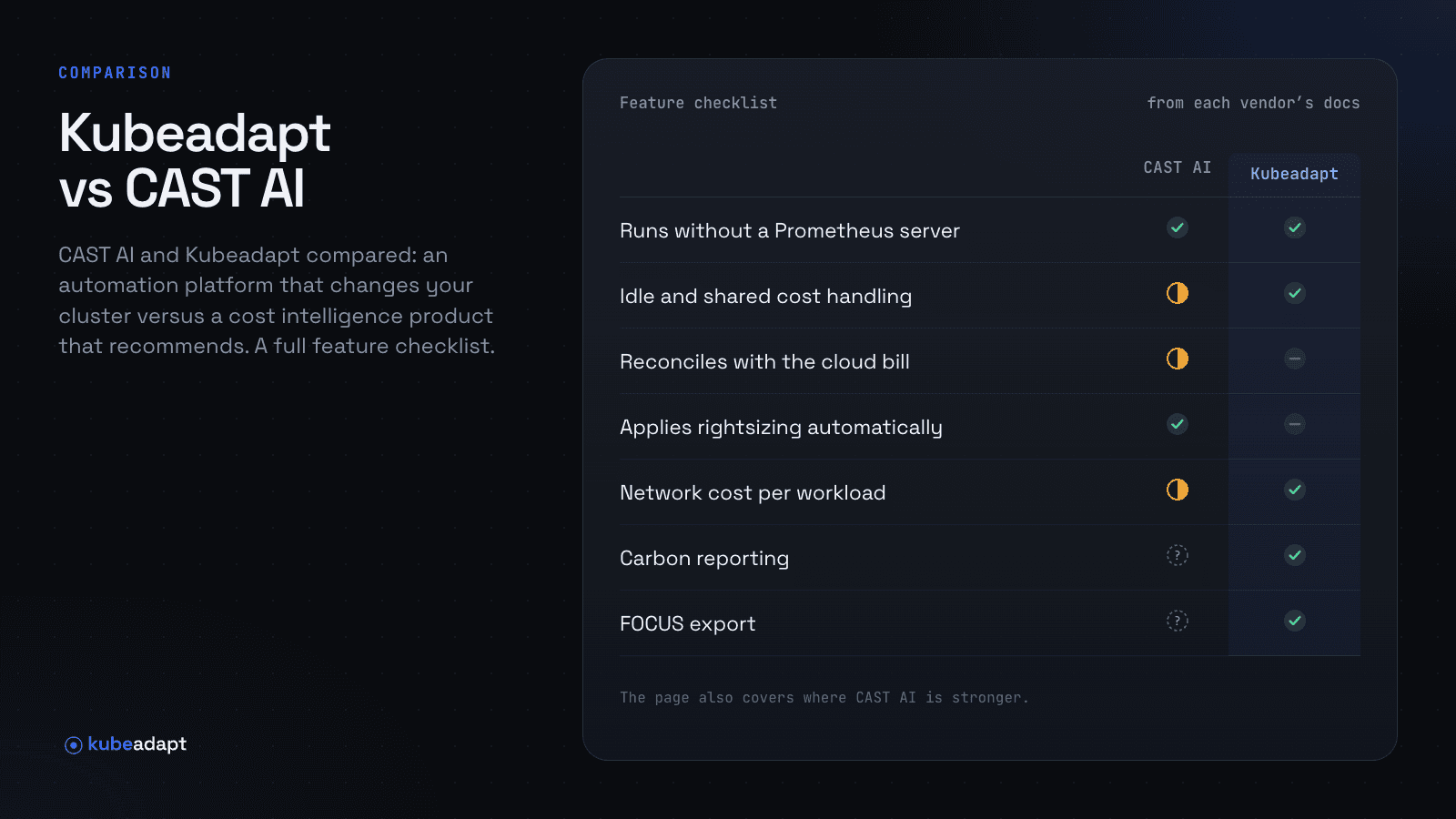
Each row was checked against CAST AI's own documentation and Kubeadapt's docs on the review date. "Not documented" means we couldn't find it in CAST AI's documentation; it doesn't mean the feature is missing.
| CAST AI | Kubeadapt | |
|---|---|---|
| Runs as | SaaS control plane; a read-only agent in the cluster, plus optimisation components when enabled | Hosted SaaS in the EU; one agent per cluster, installed with Helm |
| Runs without a Prometheus server | Yesagent plus metrics-server | Yesone agent; metrics-server is needed for rightsizing |
| Cost by namespace and workload | Yesnamespace and workload reports | Yescluster, namespace, workload, node, pod and container |
| Cost by team (labels or manual assignment) | Yesallocation groups from namespaces and labels | Yeslabels or manual assignment; split across up to 10 teams |
| Idle and shared cost handling | Partlyidle capacity can be spread across allocation groups by requests; no shared-cost rules documented | YesFully Loaded (spread) or Workload Only views |
| Reconciles with the cloud bill | Partlypublic prices with manual price adjustments for discounts; no billing import documented | Nopublic prices, plus AWS Savings Plans and reservations from a connected account |
| Rightsizing recommendations | YesWorkload Autoscaler recommendations | Yesrequests and limits per container, with a YAML patch |
| Applies rightsizing automatically | Yesin-place resize on Kubernetes 1.33+ (CPU and memory, Linux nodes) | Noby design; changes go through your own review |
| Node autoscaling or bin-packing | Yesnode autoscaling, rebalancing and instance selection | Norecommends a node layout; doesn't change nodes |
| Spot instance automation | Yesspot with on-demand fallback and interruption prediction | Nospot-readiness score per workload; doesn't move workloads |
| Network cost per workload | PartlyeBPF (Kvisor) per workload, intra- and cross-zone; internet and inter-region not yet tracked | YeseBPF at each pod's interface: cross-zone, NAT gateway and internet egress per workload |
| Carbon reporting | Not documented | YesCloud Carbon Footprint method; excludes embodied carbon |
| MCP server for AI tools | Yeshosted, API-key authentication | Yeshosted, 23 read-only tools, OAuth sign-in with SSO |
| FOCUS export | Not documentedan open-source exporter exists on GitHub, not in the product docs | YesFOCUS 1.4 as CSV or Parquet, or through the API |
Where CAST AI is stronger
It changes things for you. Node autoscaling, bin-packing, spot management and in-place rightsizing run continuously. If your team doesn't have time to act on recommendations, automation is the point.
Free cost monitoring at any size. The read-only agent gives cost monitoring for unlimited clusters at no charge.
Breadth. Beyond Kubernetes compute, CAST AI sells GPU, database and storage optimisation, and its Kvisor agent adds security reports.
Where Kubeadapt is stronger
Nothing acts on your cluster. Kubeadapt's agent only reads. Every recommendation comes with its saving and a YAML patch to apply through your normal pull request and deployment process, which matters for teams with change control or GitOps.
Allocation finance can use. Teams and departments from labels or manual assignment, splits across teams, idle and shared costs spread or kept separate, and finalized monthly reports. See cost allocation.
Internet egress and NAT, not only zones. Network Intelligence prices cross-zone, NAT gateway and internet egress per workload.
Carbon and FOCUS. GreenOps reports per workload and a FOCUS 1.4 export for your FinOps warehouse.
Using both
Automation and measurement complement each other. Teams that run CAST AI's autoscaler can still use Kubeadapt to allocate the resulting cost to teams, check what changed, and report it. Get started.