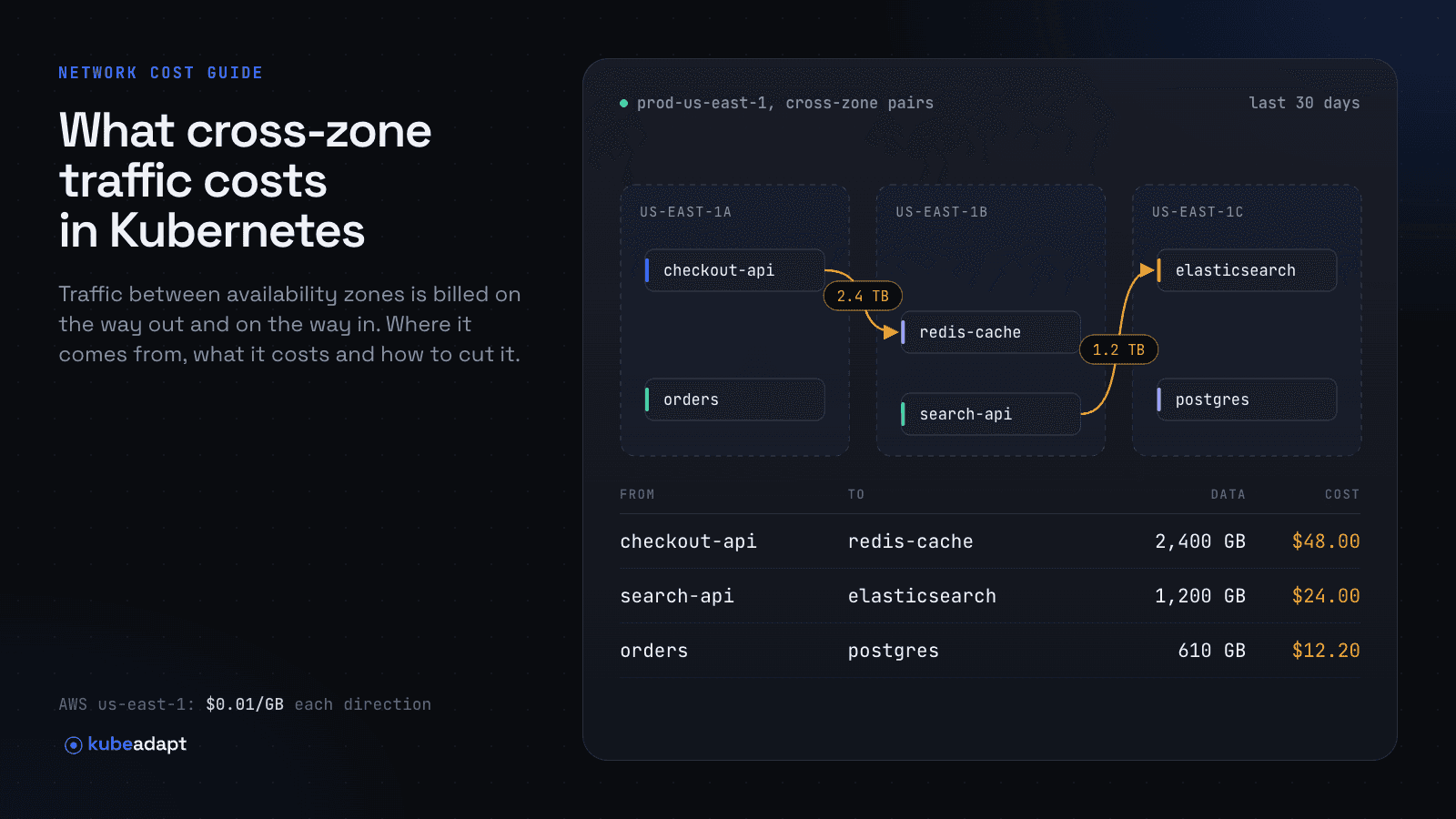
Cross-AZ data transfer is the charge for bytes that move between two availability zones in the same cloud region. As of October 2026, AWS bills it at $0.01/GB on each side of the transfer, so $0.02 for every GB that crosses; Google Cloud bills $0.01/GiB to the sender; Azure does not charge for it.
Kubernetes produces a lot of this traffic by default. A Service spreads requests evenly over every ready endpoint in the cluster, so in a three-zone cluster with an even spread of replicas, about two thirds of all Service-to-Service bytes leave the caller's zone. This guide covers the prices, where the traffic comes from, a worked dollar example, how to find it in your bill and how to reduce it.
What is cross-AZ data transfer?
Cross-AZ (inter-zone) data transfer is any network traffic between resources in different availability zones of one region. It is separate from internet egress, which is traffic leaving the cloud, and from inter-region transfer. See the glossary entry for the short definition, and egress for how the two differ.
Zones are physically separate data centers, which is why spreading a cluster across them improves availability. The price of that availability is that every pod-to-pod, pod-to-database and load-balancer-to-pod hop that crosses a zone boundary is metered.
How much does cross-AZ traffic cost on AWS, GCP and Azure?
As of October 2026, cross-AZ transfer costs an effective $0.02/GB on AWS, $0.01/GiB on Google Cloud and nothing on Azure. The table summarizes how each provider bills it.
| Provider | Price for traffic between zones in one region | Who is billed | Source |
|---|---|---|---|
| AWS | $0.01/GB "in" plus $0.01/GB "out" ($0.02/GB per crossing) | Both the sending and receiving resource | EC2 pricing |
| Google Cloud | $0.01/GiB | The project of the sending VM | Network pricing |
| Azure | Not charged | n/a | Bandwidth pricing |
AWS
AWS's EC2 pricing page states that data transferred "in" to and "out" from EC2, RDS, Redshift, DynamoDB Accelerator, ElastiCache instances and Elastic Network Interfaces across Availability Zones in the same Region "is charged at $0.01/GB in each direction." The AWS Price List API shows the same $0.01/GB rate for the DataTransfer-Regional-Bytes usage type in us-east-1, us-east-2, us-west-2, eu-west-1, eu-central-1, ap-south-1, ap-northeast-1 and sa-east-1 (offer files retrieved in October 2026).
Because both ends pay, a single GB from a pod in us-east-1a to a pod in us-east-1b costs $0.02. The AWS Data Exports documentation confirms this: for a given resource "you're charged for both inbound and outbound traffic," so each transfer produces two line items.
Three AWS details catch people out:
- Same-AZ traffic is free only on private addresses. The same pricing page charges $0.01/GB in each direction for traffic to a public or Elastic IPv4 address, even inside the Region.
- ALB and Classic Load Balancer to targets is free. Data between EC2 instances and an Application or Classic Load Balancer over private IPs in the same VPC is not charged, according to the EC2 pricing page.
- PrivateLink, Transit Gateway and Client VPN are exempt. AWS made inter-AZ transfer for these services free from April 1, 2022. Those bytes appear under
DataTransfer-xAZ-In-BytesandDataTransfer-xAZ-Out-Bytesusage types, which the Price List API lists at $0.00.
Google Cloud
Google Cloud charges $0.01 per GiB for "data transfer to a different Google Cloud zone in the same Google Cloud region when using the internal or external IP addresses within the same VPC network." Traffic within a zone on internal IPv4 or any IPv6 addresses in the same VPC is free. The cost is attributed to the project of the VM that sends the traffic, and the pricing applies to Google Kubernetes Engine (GKE) nodes.
The same page notes that traffic to and from external IPv4 addresses "leaves the zone, regardless of the destination," so pods that reach a neighbor through its external IP pay the inter-zone rate even when both are in one zone.
Azure
Azure does not charge for data transfer between availability zones in the same region. Microsoft announced this in a 2024 Azure update titled "Update on Inter-Availability Zone Data Transfer Pricing," and the current bandwidth pricing page answers "No" to "Is data transfer between Azure services located within the same region charged?" Inter-region and internet transfer are still billed.
On AKS, zone-aware routing is still worth considering for latency, but it will not change your data transfer bill.
Why does Kubernetes generate so much cross-zone traffic?
Kubernetes generates cross-zone traffic because its default Service routing ignores zones and because high-availability practice spreads everything across zones. Each of the patterns below adds bytes on its own, and they compound in a request path with several hops.
Service load balancing spreads requests over every zone
When a Service has no trafficDistribution set, "the default strategy is to distribute traffic evenly to all endpoints in the cluster," according to the Kubernetes Service proxy reference. The Amazon EKS best practices guide describes the result: kube-proxy's rules distribute traffic "across all pods in the cluster, regardless of their node or AZ placement."
If clients and endpoints are spread evenly over N zones, a random endpoint is in the caller's zone with probability 1/N. That makes the cross-zone share 50% with two zones, about 67% with three and 75% with four. The fix is topology-aware routing.
Multi-AZ node groups and replica spread
Node groups that span several zones, and topology spread constraints that put replicas in every zone, are the right call for availability. They also guarantee that every Service has endpoints outside the caller's zone, which is what the default routing then uses.
Stateful systems replicate across zones
Databases, message brokers and caches that keep replicas in several zones copy every write across zone boundaries. A Kafka topic with three replicas in three zones sends each produced byte to followers in other zones, and consumers read from the partition leader by default. Kafka's KIP-392 added client.rack and RackAwareReplicaSelector so consumers can fetch from a replica in their own zone. Managed databases count too: AWS's cross-AZ rate applies to RDS and ElastiCache. The details are in stateful workloads and cross-zone traffic.
Load balancers and NodePort hops
A cloud load balancer that sends traffic to node ports adds a second hop: kube-proxy on the receiving node forwards the packet to a pod that may sit in another zone. The EKS best practices guide calls this out for AWS Load Balancer Controller "instance mode" and recommends "ip mode," which sends traffic straight to pod IPs. On Network Load Balancers, cross-zone load balancing is off by default, and AWS notes that "EC2 data transfer charges apply" when you enable it.
DNS queries to CoreDNS in other zones
Pods resolve names through the CoreDNS Service, so queries follow the same zone-blind routing as any other Service. The Kubernetes documentation for NodeLocal DNSCache notes that without a local cache, pods "have to reach out to a different node, if there is no local CoreDNS instance." DNS packets are small, so the dollar amount is usually modest, but query volume can be very high.
NAT gateways and shared egress paths
A pod that reaches the internet through a NAT gateway in another zone pays cross-AZ transfer on the way to the gateway, on top of the gateway's own charges. That case is covered in EKS NAT gateway cost and the NAT gateway glossary entry.
How much will a chatty service cost? A worked example
A service pair that exchanges 600 GB a day across three evenly used zones costs about $240 a month in cross-AZ transfer on AWS. Here is the arithmetic, which you can reuse with your own numbers.
Assume checkout calls inventory through a ClusterIP Service. Both run three replicas, one per zone, and clients are spread evenly. Requests plus responses total 600 GB a day.
| Step | Value |
|---|---|
| Bytes per month (30 days) | 600 GB × 30 = 18,000 GB |
| Share crossing zones (3 zones, uniform) | 2/3 |
| Cross-zone bytes | 12,000 GB |
| AWS at $0.01/GB each direction | 12,000 × $0.02 = $240/month ($2,880/year) |
| Google Cloud at $0.01/GiB | 12,000 GB ≈ 11,176 GiB × $0.01 = about $112/month |
| Azure | $0 |
The same model at other volumes on AWS, still three zones with an even spread:
| Service-to-Service traffic per day | Cross-zone GB per month | AWS cost per month |
|---|---|---|
| 100 GB | 2,000 | $40 |
| 1 TB (1,000 GB) | 20,000 | $400 |
| 10 TB (10,000 GB) | 200,000 | $4,000 |
Two adjustments make the model match a real cluster:
- Uneven placement. The same-zone share is the sum, over zones, of the callers' share in that zone times the endpoints' share in that zone. If either side is spread evenly, it stays 1/N. It gets worse when both are skewed in different directions: with 80% of callers in one zone that holds only one of six endpoints, and the other five endpoints split between the remaining two zones, about 78% of bytes cross.
- Multiple hops. Each hop in a request path is billed separately. Ingress to frontend to API to database is three chances to cross a zone.
Applying trafficDistribution: PreferSameZone to the inventory Service, with endpoints in every zone, keeps those requests in the caller's zone, and the $240 drops toward zero. The caveats are in the topology-aware routing guide.
How do I find cross-AZ charges in my cloud bill?
On AWS, cross-AZ transfer appears in the Cost and Usage Report (CUR) under the usage type {Region}-DataTransfer-Regional-Bytes, for example USE2-DataTransfer-Regional-Bytes for US East (Ohio). Usage types without a Region prefix, such as plain DataTransfer-Regional-Bytes, come from US East (N. Virginia).
That usage type covers more than pod-to-pod traffic. AWS documents operations including InterZone-In, InterZone-Out, LoadBalancing, PublicIP-In, PublicIP-Out and VPCPeering-In/Out under it, so group by line_item_operation before drawing conclusions. This query works against a CUR table in Athena when resource IDs are included in the report:
1SELECT
2  line_item_usage_type,
3  line_item_operation,
4  line_item_resource_id,
5  SUM(line_item_usage_amount)   AS usage_gb,
6  SUM(line_item_unblended_cost) AS cost_usd
7FROM cur
8WHERE line_item_usage_type LIKE '%DataTransfer-Regional-Bytes'
9  AND line_item_usage_start_date >= TIMESTAMP '2026-09-01 00:00:00'
10  AND line_item_usage_start_date <  TIMESTAMP '2026-10-01 00:00:00'
11GROUP BY 1, 2, 3
12ORDER BY cost_usd DESC
13LIMIT 50;
On Google Cloud, inter-zone transfer is billed to the sending VM's project, so filter the Cloud Billing export for inter-zone data transfer SKUs by project. On Azure there is nothing to find for traffic between zones.
The bill stops at the instance or network interface. A Kubernetes node runs dozens of pods, so the CUR can tell you that node i-0abc… paid $90 in InterZone-Out, but not which Deployment sent the bytes. Attributing the cost to workloads takes flow data joined to pod metadata, which is the subject of how to measure cross-AZ traffic per workload.
How do I reduce cross-AZ data transfer in Kubernetes?
Reduce cross-AZ transfer by keeping each request in the caller's zone when a healthy endpoint is there, and by removing extra hops. Measure first, so you work on the few workloads that carry most of the bytes.
- Route Services within the zone. Set
trafficDistribution: PreferSameZone(orPreferCloseon older clusters) on chatty Services, orPreferSameNodefor node-local caches. See topology-aware routing. - Spread replicas so every zone has endpoints. Use topology spread constraints on
topology.kubernetes.io/zone. Zone-local routing only works where a local endpoint exists. - Remove load balancer double hops. Send traffic directly to pod IPs (ip target mode on AWS) or use
externalTrafficPolicy: Local, and leave NLB cross-zone load balancing off unless you need it. - Make stateful clients zone-aware. Read from replicas in the caller's zone where the system supports it, such as Kafka's
client.rack. See stateful workloads and cross-zone traffic. - Cache DNS on the node. NodeLocal DNSCache answers most lookups without leaving the node.
- Keep NAT and egress paths in the same zone. One NAT gateway per zone avoids paying cross-AZ transfer on the way out. See EKS NAT gateway cost and Kubernetes internet egress cost.
- Use private addresses. Pod-to-pod and pod-to-database traffic through public IPs is charged even within one zone on AWS and Google Cloud.
Do not collapse a production cluster into one zone just to save transfer costs. The EKS best practices guide recommends multi-AZ deployments and treats single-AZ placement as a reliability trade-off you must choose explicitly.
How Kubeadapt measures this
Kubeadapt's Network Intelligence shows cross-zone and internet traffic cost per workload. The optional eBPF agent, kubeadapt-k8s-pulse, runs as one DaemonSet pod per node, counts bytes per connection without sidecars and never records payloads. Kubeadapt shows the cost and the workloads behind it. It never changes your workloads. See Network Intelligence and the eBPF agent docs.
FAQ
Is cross-AZ traffic charged in both directions on AWS?
Yes. AWS charges $0.01/GB "in" and $0.01/GB "out" for traffic between Availability Zones, so each GB that crosses costs $0.02 in total. A request and its response are each billed this way.
Is traffic between pods on the same node or in the same zone free?
Traffic between pods on one node never touches the cloud network, so it is not billed. Traffic between nodes in the same zone over private IPs is free on AWS and Google Cloud. Traffic sent to a public or external IP is billed even inside one zone.
Does Azure charge for traffic between availability zones?
No. Microsoft announced in 2024 that it does not charge for data transfer between availability zones in the same region, and the Azure bandwidth pricing page lists in-region transfer between services as not charged.
Does topology-aware routing remove all cross-AZ cost?
No. It keeps Service traffic in the caller's zone when that zone has a ready endpoint. It does not affect database replication, traffic to external IPs, load balancer hops or traffic that falls back to other zones when a zone has no endpoints.
Why doesn't my bill show which workload caused the charge?
Cloud bills meter instances and network interfaces, not pods. To attribute cross-zone bytes to a Deployment you need flow-level data mapped to pods and zones; see measuring cross-AZ traffic per workload.
Sources
- Amazon EC2 On-Demand Pricing: Data Transfer within the same AWS Region
- AWS Price List API: AWSDataTransfer offer file (us-east-1)
- AWS Data Exports: Understanding data transfer charges
- AWS blog: Understand AWS data transfer details in depth from the Cost and Usage Report
- AWS: Data transfer price reduction for PrivateLink, Transit Gateway and Client VPN (2022)
- Google Cloud: All networking pricing (VM-to-VM data transfer)
- Azure: Bandwidth pricing
- Azure Updates: Update on Inter-Availability Zone Data Transfer Pricing
- InfoQ: Azure stops charging for data transfer between availability zones
- Kubernetes: Virtual IPs and Service Proxies (traffic distribution)
- Kubernetes: Using NodeLocal DNSCache
- Amazon EKS Best Practices: Cost Optimization - Networking
- Elastic Load Balancing: Cross-zone load balancing
- Network Load Balancer: Cross-zone load balancing for target groups
- Apache Kafka KIP-392: Allow consumers to fetch from closest replica