
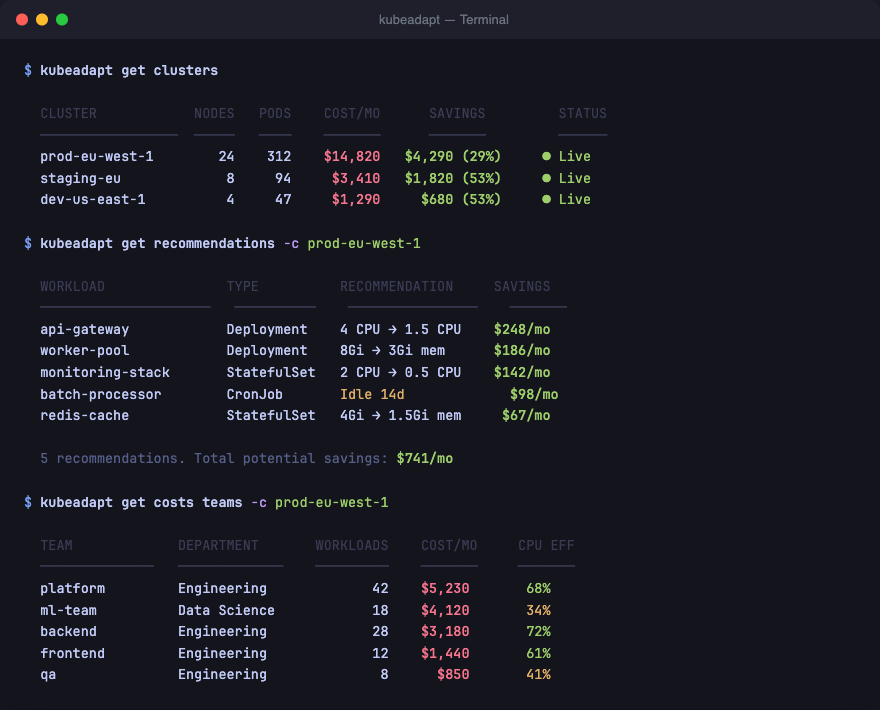
Why a CLI
Dashboards are great for exploration. But when you're in the terminal, switching to a browser to check cluster costs breaks your flow.
kubeadapt talks directly to the Kubeadapt API. Authenticate once, then query clusters, nodes, workloads, costs, and recommendations without leaving your terminal. See the CLI documentation for the full reference.
Install
bash
# Homebrew
brew install kubeadapt/tap/kubeadapt-cli

# Binary (GitHub Releases)
# Download from github.com/kubeadapt/kubeadapt-cli/releases
Authenticate
bash
kubeadapt auth login
kubeadapt auth status<!-- callout:tip -->You need an API key to authenticate. Create one from Settings > API Keys in the dashboard.
What you can do
Clusters and infrastructure
bash
1kubeadapt get clusters              # All connected clusters
2kubeadapt get cluster my-prod       # Cluster detail
3kubeadapt get nodes -c my-prod      # Node inventory
4kubeadapt get node-groups -c my-prod # Node group breakdown
5kubeadapt get namespaces -c my-prod # Namespace list
6kubeadapt get pvs -c my-prod       # Persistent volumes
Workloads and recommendations
bash
kubeadapt get workloads -c my-prod         # All workloads with resource usage
kubeadapt get recommendations -c my-prod   # Right-sizing suggestions
Cost queries
bash
kubeadapt get overview                    # Cross-cluster cost summary
kubeadapt get dashboard                   # Key metrics at a glance
kubeadapt get costs teams -c my-prod      # Cost by team
kubeadapt get costs departments -c my-prod # Cost by department
Output formats
Every command supports --output (-o):
bash
kubeadapt get clusters -o json    # JSON (pipe to jq, feed into scripts)
kubeadapt get clusters -o yaml    # YAML
kubeadapt get clusters -o table   # Styled table (default)
Debugging
Pass --verbose to see API endpoints, request timing, and status codes:
bash
kubeadapt get clusters --verbose