CloudZero builds its platform around unit economics: cost per customer, per feature, per transaction, across cloud, SaaS and AI bills. Allocation lives in Dimensions, built in Dimension Studio or written as CostFormation YAML, and Kubernetes arrives as one more source through an agent that splits each VM's billed cost across its pods every hour, with data in CloudZero within 48 hours. Kubeadapt covers Kubernetes only and is built for the cluster itself: cost per container every minute, idle shown as its own number, cross-zone and NAT gateway cost per workload from eBPF at the pod, Executive and Engineering reports on a schedule, and the cloud bill reconciled onto each workload.
The short version
If finance asks what each customer, product or feature costs, across cloud, SaaS and AI bills, CloudZero is built for that question. Kubeadapt answers what each Kubernetes workload costs and why. Unused node capacity shows as its own number, where CloudZero counts a node as fully used once pods reach 75% of it. NAT gateway, cross-zone and load balancer traffic is priced per workload, with destinations such as S3 named, where CloudZero's network recommendations point at the gateway or the account. Finance gets an Executive report and the platform team an Engineering report, and GPUs are costed per pod and team, self-hosted models per deployment and per million tokens. Kubeadapt has no unit economics and does not cover spend outside Kubernetes; when that is the goal, CloudZero is the right tool.
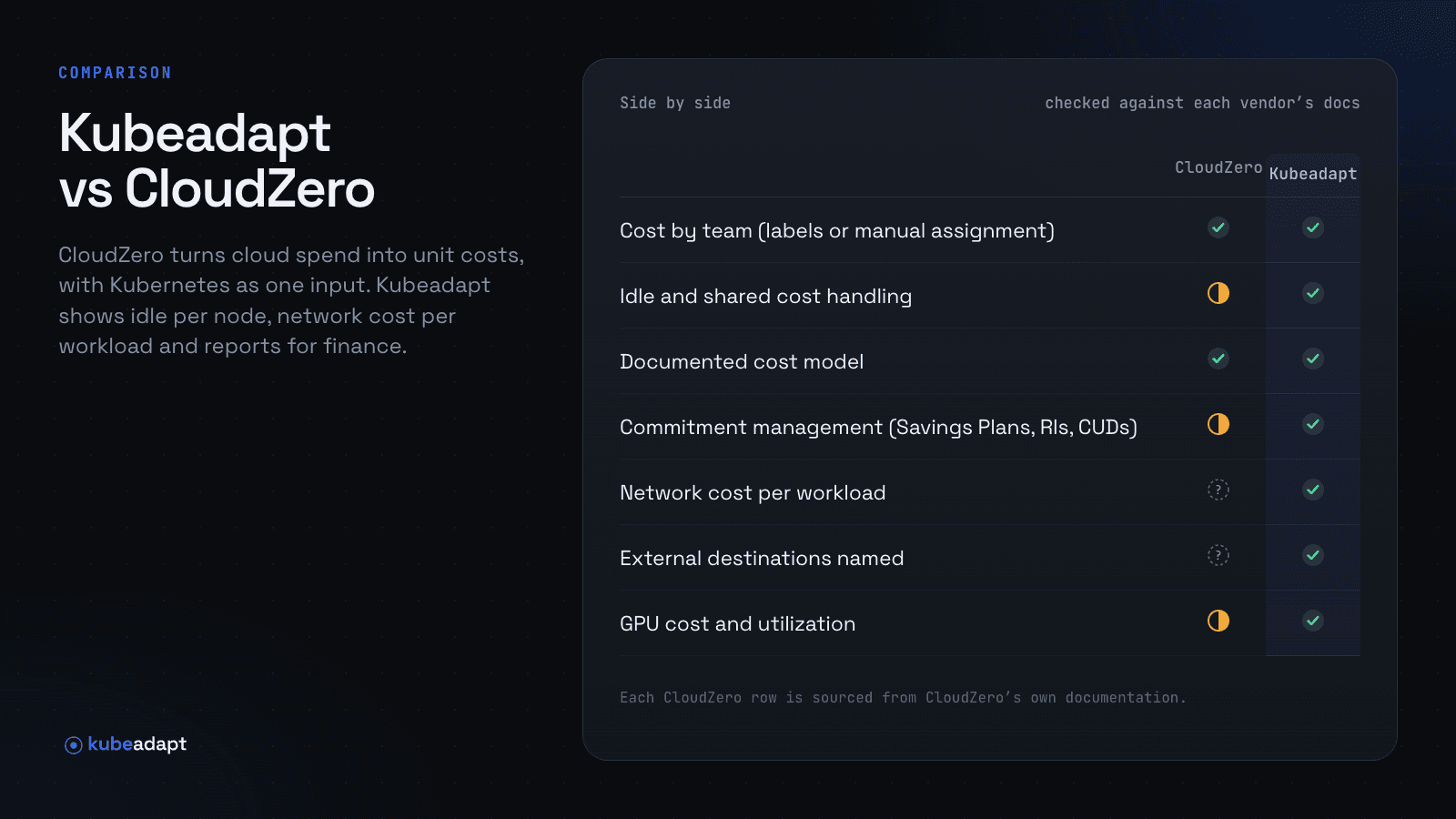
Side by side
| CloudZero | Kubeadapt | |
|---|---|---|
| Runs as | SaaS; cloud, SaaS and AI bills, plus agent | Hosted SaaS (EU), one Helm chart |
| Cost by team (labels or manual assignment) | YesDimensions from labels and rules | Yeslabels or manual, with splits |
| Idle and shared cost handling | Partlyshared rules; idle only under 75% | Yesidle shown separately |
| Documented cost model | Yesbilled VM cost split hourly | Yes |
| Reconciles with the cloud bill | Yesseven cost types, billed to amortized | YesAWS, Azure, Google Cloud |
| Cost spike alerts | Yeshourly, global and per View | Yeslearned baselines |
| Budget alerts | Yesmonthly, per View | Yes |
| Scheduled PDF reports | Yesdashboards as PDF, CSV or PNG | Yes |
| Commitment management (Savings Plans, RIs, CUDs) | PartlyAWS purchase advice, RI expiry alerts | Yescoverage, utilization, expiries |
| Rightsizing recommendations | YesCPU and memory, from 30 days | Yesrequests and limits, as YAML |
| Network cost per workload | Not documentedNAT flagged per gateway or account | YeseBPF, measured per pod |
| External destinations named | Not documented | Yesfrom DNS |
| GPU cost and utilization | PartlyGPU usage splits node cost | Yes |
| LLM inference cost | YesAI provider spend, from tokens | Yesper model, per 1M tokens |
| MCP server for AI tools | YesAI Hub, read and write | Yeshosted, read-only |
Checked against CloudZero's documentation, agent chart and pricing page on November 19, 2026. "Not documented" means we could not find it there.
How idle is counted on a busy node pool
CloudZero counts a node's CPU, memory or GPU as fully used in an hour when pods use or request, whichever is higher, an average of 75% of it. Below that line the difference goes to an Idle bucket. Above it, the node's billed cost goes to its pods in proportion to what they consume.
Take a node pool of 40 m6i.2xlarge nodes at $0.384 an hour (Linux on-demand, us-east-1): $11,212.80 a month over 730 hours. Pods request 78% of CPU and memory on average (an example). Under the 75% rule those node hours carry no idle line, and the unrequested 22%, about $2,467 a month, sits inside the pod costs. It raises every team's figure a little, and no report calls it idle.
Kubeadapt charges each container the greater of its request and its usage every minute, and what is left of the node is idle, shown as its own number: the $2,467 stays in view. You then choose how teams see it. Fully Loaded spreads idle and shared cost over the workloads, so team totals add up to the cluster's cost; Workload Only leaves them out, so a team sees what its own containers reserved. Node layout recommendations size instance types and node groups from real requests, which is where that 22% can come back once your team applies them, and how costs are computed walks through each correction with a worked example.
Which workload is behind the NAT gateway line
CloudZero's AWS recommendations include "Managed NAT Gateway with Excessive Data Transfer", raised when data transfer is more than 60% of a gateway's cost, and a cross-region check per account. Both point at the gateway or the account. In a shared EKS cluster, every pod in a private subnet leaves through the same few gateways, so the recommendation says the gateway is expensive without naming the service that sent the bytes.
For example, a gateway processes 25 TB a month. At $0.045 per GB processed (us-east-1), that is $1,125. In Kubeadapt's Network Intelligence, Destinations names where the bytes went from DNS: 18 TB of it is media-transcoder writing to S3 in the same region. AWS charges NAT processing on S3 traffic too, and an S3 gateway endpoint costs $0, so adding one to the VPC's route tables takes $810 a month off. The eBPF agent measures at each pod's interface, so the cost lands on media-transcoder, not on the node or on the namespace it shares with three other services. The NAT gateway guide has the endpoint setup.
Month-end, with one report for finance and one for the platform team
CloudZero's Scheduled Dashboard delivery sends any Analytics Dashboard your team has built as a PDF, a CSV zip or a PNG, by email, webhook, S3 or SFTP, and each View sends weekly cost trends on Tuesdays.
Kubeadapt ships two reports. The Executive report, 5 pages for managers and finance, says what was spent, how it changed, what drove it and what each team cost. The Engineering report, 6 to 13 pages, covers workloads, rightsizing, nodes, network and savings with dates. Both are generated once or on a schedule and arrive by email and Slack, and who can open a report follows each reader's cluster permissions.
Team figures come from labels or from the assignment workbench, where one workload can be split across up to 10 teams: a shared search-api charged 60/30/10 to search, checkout and ads, for example. With the AWS CUR 2.0 export, Azure Cost Management exports or the Google Cloud billing export connected, Savings Plans, Reserved Instances, committed use discounts, spot prices and credits land on the workload that used them, so the Executive report ties to the invoice. Follow-up questions go to Kubeadapt AI, which answers inside the app with charts.
GPU nodes and the models they serve
CloudZero's agent collects GPU usage, which feeds how each GPU node's billed cost is split across pods, and Explorer's efficiency columns show GPU requests. The 75% rule applies to GPUs too. AI Signals covers spend with model providers such as OpenAI and Anthropic, estimated from token volume at published market rates. Serving your own models on the cluster is not in the docs.
Kubeadapt's GPU & LLM Observability reads NVIDIA DCGM Exporter metrics and shows GPU utilization, GPU memory and cost per GPU, pod, workload and team. MIG slices and time-sliced GPUs are costed separately, and idle or under-used GPUs are listed with what they cost. Suppose eight GPUs behind an internal assistant sit idle from Friday night to Monday morning, 60 hours at $2 per GPU-hour (an example rate): $960 every weekend, listed with the pods that hold them. For models served with vLLM, NVIDIA Triton or Text Generation Inference, Kubeadapt shows cost per model deployment and per million tokens, with throughput and latency next to it. A deployment that costs $5,400 a month and serves 3 billion tokens comes to $1.80 per million.
Where CloudZero is stronger
- CloudZero reports unit costs. Telemetry streams bring business metrics in by API or CSV, so you see cost per customer, order or feature, across several Dimensions at once. Kubeadapt has no unit cost feature.
- Its allocation is built for finance. Allocation Dimensions split shared and unknown spend evenly, in proportion to spend, by usage data or at a fixed rate, and send any remainder to a default element so the total reconciles with the bill. Seven cost types run from Real and Billed to Invoiced Amortized.
- It covers the whole bill: cloud, SaaS and AI providers sit in one model, and AI Signals tracks spend with OpenAI and Anthropic by model and user. Kubeadapt covers Kubernetes only.
- Anomaly detection runs hourly across accounts, services and each View's teams or products, shows engineering events next to each anomaly and opens Jira tickets, and AI Hub brings the data into Claude Code, Cursor and other MCP clients.
Adding Kubeadapt next to CloudZero
Install Kubeadapt's Helm chart on one cluster next to the CloudZero agent: one agent, no Prometheus server, no in-cluster database, and cost per workload in about 5 minutes. In week one, compare a namespace in CloudZero's Discounted Amortized cost type with Kubeadapt in amortized mode, once your billing export is connected. The figures will differ for known reasons. CloudZero splits node cost hourly in proportion to use and records idle only below 75%; Kubeadapt charges the greater of request and usage every minute, so compare Kubeadapt's Workload Only view plus its idle number with CloudZero's namespace plus its Idle bucket. CloudZero's default Real Cost also leaves out tax and support fees. For the warehouse, Kubeadapt exports workload cost as FOCUS 1.4 in CSV or Parquet, or through the API.
Install Kubeadapt on one cluster, or book a demo to walk through the Executive report and Network Intelligence on your own data.
Sources
- CloudZero: Kubernetes
- CloudZero: Kubernetes efficiency metrics in Explorer
- CloudZero: Recommendations for Kubernetes
- CloudZero: Recommendations for AWS
- CloudZero: Allocating shared and unknown spend
- CloudZero: Cost types
- CloudZero: Anomaly detection
- CloudZero: Notifications and scheduled dashboard delivery
- CloudZero: Real-time AI spend with AI Signals
- CloudZero: MCP server reference
- CloudZero: Unit economics
- CloudZero: Budgets
- CloudZero agent Helm chart
- Kubeadapt: How costs are computed
- Kubeadapt: Assignment workbench