Datadog Cloud Cost Management (CCM) is the cost product inside the Datadog platform. It reads AWS, Azure, Google Cloud and Oracle bills along with SaaS and AI provider costs, and allocates Kubernetes cost through the Datadog Agent and Cluster Agent you run for monitoring, at a list price per $1,000 of cloud spend. Kubeadapt is a separate product built around Kubernetes: cost for every container every minute, network cost priced at each pod's own interface, CPU recommendations that account for your HPAs, and PDF reports written separately for finance and for the platform team.
The short version
If Datadog already watches every host, CCM puts cost beside your traces and monitors. Kubeadapt allocates every minute where CCM allocates per day. Its optional eBPF agent prices NAT gateway, cross-zone, internet egress and load balancer traffic for each workload and names the destinations, where CCM splits each node's billed data transfer by traffic volume and needs Cloud Network Monitoring on every host. Its CPU recommendations account for HPA targets; Datadog's own autoscaler replaces the HPA instead. CCM is the better fit when Datadog is your system of record, when you want SaaS and AI provider bills next to Kubernetes cost, or when you want requests and replicas changed for you: Kubernetes Autoscaling does that, and Kubeadapt only recommends.
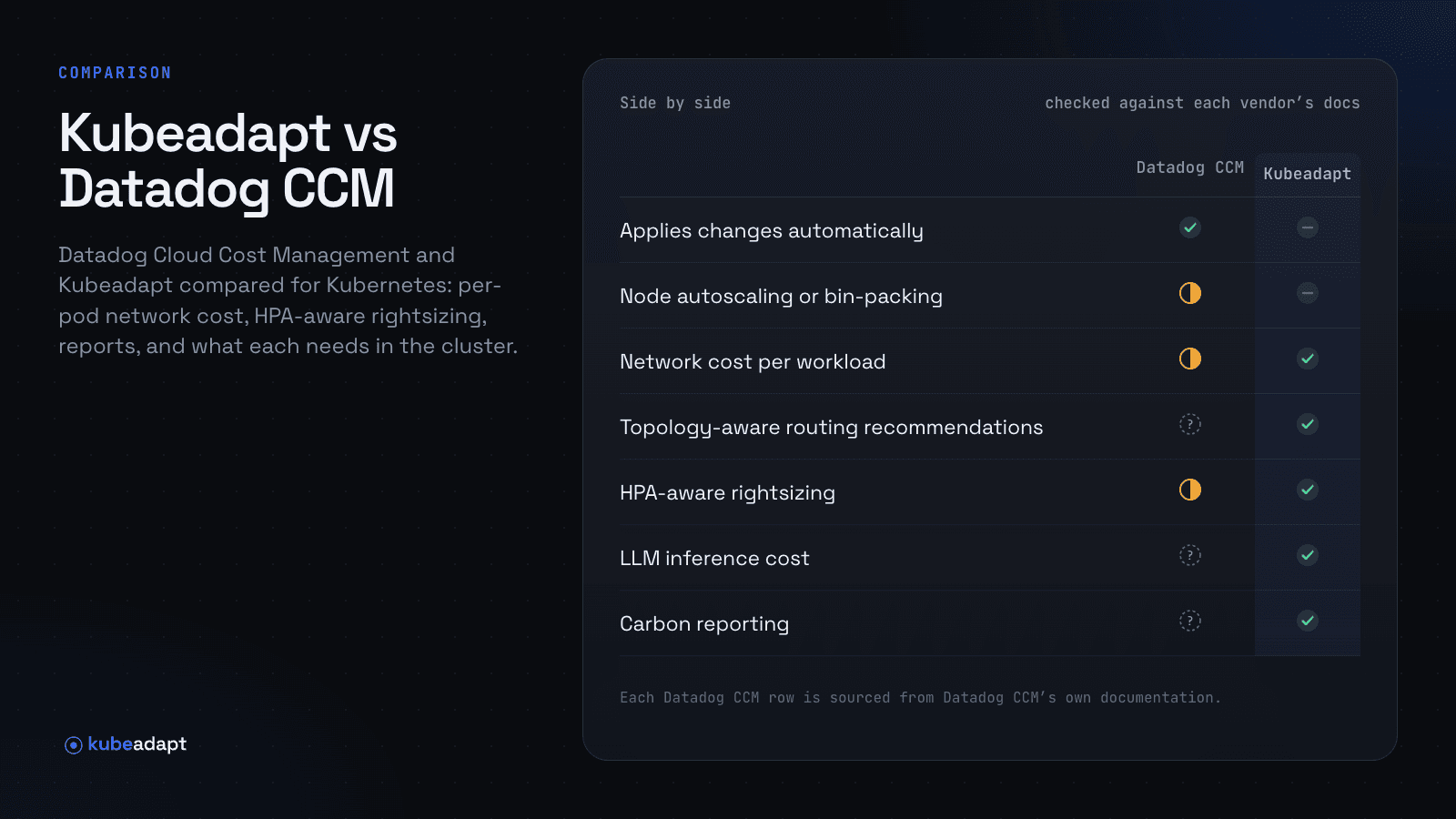
Side by side
| Datadog CCM | Kubeadapt | |
|---|---|---|
| Runs as | Part of Datadog, via the Datadog Agent | Hosted SaaS (EU), one Helm chart |
| Applies changes automatically | Yesvia Kubernetes Autoscaling | Norecommends only |
| Node autoscaling or bin-packing | Partlycluster autoscaling in preview | No |
| Cost by namespace and workload | Yesdown to the pod, per day | Yesdown to the container, per minute |
| Network cost per workload | Partlynode transfer split by traffic | YeseBPF, measured per pod |
| Topology-aware routing recommendations | Not documented | Yes |
| Rightsizing recommendations | YesDownsize Deployment, Helm pull requests | Yesrequests and limits, as YAML |
| HPA-aware rightsizing | Partlyits autoscaler replaces the HPA | Yes |
| Cost spike alerts | Yesanomalies from daily cost | Yeslearned baselines |
| Scheduled PDF reports | Yesemail, Slack, Microsoft Teams | Yes |
| Reconciles with the cloud bill | YesAWS, Azure, Google Cloud, Oracle | YesAWS, Azure, Google Cloud |
| Commitment management (Savings Plans, RIs, CUDs) | Yescoverage, utilization, expiries | Yescoverage, utilization, expiries |
| GPU cost and utilization | Yeswith the DCGM integration | Yes |
| LLM inference cost | Not documentedfor self-hosted models | Yesper model, per 1M tokens |
| Carbon reporting | Not documented | Yesincludes embodied |
| MCP server for AI tools | Yeshosted, with a cost toolset | Yeshosted, read-only |
Checked against Datadog's documentation and price list on November 19, 2026. "Not documented" means we could not find it there.
What CCM needs in the cluster and on the invoice
Container cost allocation needs Datadog Agent 7.27 and Cluster Agent 1.11 or later with Orchestrator Explorer enabled. Data transfer allocation needs Agent 7.58 and, in Datadog's words, "Cloud Network Monitoring must be enabled on all AWS hosts," a product with its own charge. GPU allocation needs the DCGM integration, and applying rightsizing automatically is Kubernetes Autoscaling, also priced on its own.
On Datadog's price list, billed annually on the US site in November 2026, CCM Pro is $5 per $1,000 of cloud and SaaS spend per month and Enterprise is $10. Cloud Network Monitoring is $5 a month for each host, and Kubernetes Autoscaling is $3 a month for each vCPU it manages. For example, an organization spending $300,000 a month on cloud with 80 Kubernetes hosts pays $1,500 a month for CCM Pro and $400 for the Cloud Network Monitoring that data transfer allocation requires.
Kubeadapt needs one Helm chart and no observability agent, so it runs the same on a cluster Datadog watches and on one it does not. Its agent opens an HTTPS connection out with a per-cluster token, there is no Prometheus server or in-cluster database, and the first cost figures arrive about 5 minutes after the install. Network measurement is an optional eBPF agent from the same Helm chart, on Linux kernel 5.10 or newer.
A NAT gateway line, priced per workload
For example, an image-sync Deployment on EKS pulls 30 TB a month from S3 in the same region through a NAT gateway. AWS charges $0.045 per GB processed (us-east-1), so that is $1,350 a month. An S3 gateway endpoint carries the same traffic for $0, but first someone has to find the workload, and the AWS bill never names the pod.
CCM's data transfer allocation starts from the node: it joins each node with its data transfer charges, then splits that cost over the day's workloads by their traffic volume. Cost that cannot be matched to traffic Cloud Network Monitoring saw stays unallocated, and for workloads built on custom resources it goes to the cluster level only. On Azure and Google Cloud, Datadog lists NAT gateways and load balancers among the charges it does not allocate; its AWS section does not mention NAT gateway charges.
Kubeadapt's eBPF agent measures every flow at the pod's own network interface, and Network Intelligence prices it by path with AWS or Azure published rates or your own rate card. Destinations shows S3 named from DNS, with image-sync as the workload behind the NAT gateway cost; the NAT gateway guide walks through the endpoint change. The same view covers cross-zone traffic, internet egress and load balancers, counts the node's own traffic (kubelet, the container runtime, host-network pods), and shows which Services would save money with trafficDistribution: PreferSameZone.
Rightsizing a Deployment that keeps its HPA
CCM's Downsize Deployment recommendation flags containers "using only a fraction of their requested CPU or memory", and Bits Code can open a pull request against the Helm chart. Its documentation does not say how the recommendation treats an HPA. Datadog Kubernetes Autoscaling is described as "an alternative to Horizontal Pod Autoscaler (HPA) and Vertical Pod Autoscaler (VPA)", and Datadog recommends removing them from a workload before enabling it.
For a team that keeps its HPAs, the interaction matters. The HPA computes utilization as a percentage of the request and sets desiredReplicas = ceil(currentReplicas × currentMetricValue / desiredMetricValue). Take an example api Deployment held at an HPA minimum of 10 replicas with a 70% CPU target. Each pod requests 1 vCPU and 2 GiB and uses 0.3 vCPU.
A recommendation that looks only at usage cuts the CPU request to 0.35 vCPU. Utilization jumps to 86% of the request, above the 70% target, and the HPA asks for ceil(10 × 86 / 70) = 13 replicas. Total CPU requested falls from 10 vCPU to 4.55 instead of the promised 3.5, and three new pods add 6 GiB of memory requests. A cut to 0.45 vCPU leaves utilization at 67%, under the target, so the HPA stays at 10 replicas: 4.5 vCPU requested, no new pods, and a larger saving from a smaller cut.
Kubeadapt's workload rightsizing does that arithmetic for every container. CPU recommendations account for the HPA target, memory recommendations account for OOM kills, and each comes from at least a week of minute-level usage with headroom chosen per environment, shown with the saving, the usage behind it and a YAML patch. Kubeadapt does not apply the patch; your team does, for example by asking Claude Code to open the pull request through Kubeadapt MCP. If you want requests and replicas changed for you, Datadog Kubernetes Autoscaling does that.
Month end for finance and the platform team
CCM's scheduled reports send "periodic snapshots of cost metrics" from a saved cost report, as a PDF to email, Slack or Microsoft Teams. Kubeadapt writes two reports for two readers. Finance and managers get the Executive report, five pages on spend, how it moved, what moved it and each team's share. The platform team gets the Engineering report, 6 to 13 pages on workloads, rightsizing, nodes, network and savings with dates. Each runs once or on a schedule by email and Slack, private or shared, with access following each reader's cluster permissions.
Behind both reports, Savings Plans, Reserved Instances, committed use discounts, spot prices and credits from the CUR 2.0, Azure or Google Cloud billing export land on the workloads that used them, and idle cost appears as its own number. Commitment Manager shows which workloads consume each commitment and sizes the next one from the steady baseline your clusters run anyway, not from the peak. GreenOps adds kg CO₂e per workload and team, embodied hardware emissions included, as monthly PDF and spreadsheet reports.
Where Datadog CCM is stronger
If Datadog is already your system of record, CCM needs no new agent and puts cost beside the traces, logs and monitors your engineers use every day.
It covers more of the bill. Oracle, SaaS and AI provider bills from OpenAI, Anthropic, Amazon Bedrock and others sit next to AWS, Azure and Google Cloud, custom costs can be uploaded in FOCUS format, and anomaly detection with Watchdog Explains runs across all of it. Kubeadapt covers Kubernetes and reconciles with AWS, Azure and Google Cloud bills.
It applies changes. Kubernetes Autoscaling sets requests and replicas for up to 1,000 workloads per cluster, in place on Kubernetes 1.33 and later, and cluster autoscaling is in preview. Kubeadapt recommends; it does not apply changes or scale nodes.
Running Kubeadapt alongside Datadog
The Kubeadapt agent installs next to the Datadog Agent with one Helm command and does not change your monitoring. In the first week, compare namespace totals for the same days. Expect gaps where the two models differ: CCM splits each host 60% CPU and 40% memory and does not redistribute cluster idle by default, so compare it with Kubeadapt's Workload Only view before Fully Loaded. Network figures will differ most where Cloud Network Monitoring is not running and for NAT gateway and load balancer traffic. After about 7 days, put Kubeadapt's recommendations for your HPA-scaled workloads next to CCM's Downsize Deployment list.
Add Kubeadapt to one cluster next to the Datadog Agent, or book a demo.