PerfectScale, owned by DoiT since February 2025, is built around the question an SRE asks before cutting a request: will this pod survive it? Its PodFit view puts OOM kills, CPU throttling, evictions, restarts and HPAs stuck at max replicas next to the waste, and its automation raises resources at once when a workload is at risk and lowers them step by step when it is not. Kubeadapt also recommends requests, as a YAML patch, and does not apply them. It goes further on the cost around the container: which team pays for it, what its cross-zone and NAT gateway traffic costs, and how commitments cover it.
The short version
Both products size requests with HPAs in view. PerfectScale also applies the change; Kubeadapt does not, so your team ships the patch. What Kubeadapt adds is the money outside the request: it measures each pod's traffic with eBPF and prices cross-zone and NAT gateway bytes per workload, splits shared workloads across up to 10 teams, and sizes Savings Plans from the baseline you run after rightsizing. Finance gets an Executive report on a schedule, and spike alerts compare spend with a normal range learned for each scope by hour of day. Pick PerfectScale when you want requests, HPAs and bin packing changed for you, or when you need to run the product yourself.
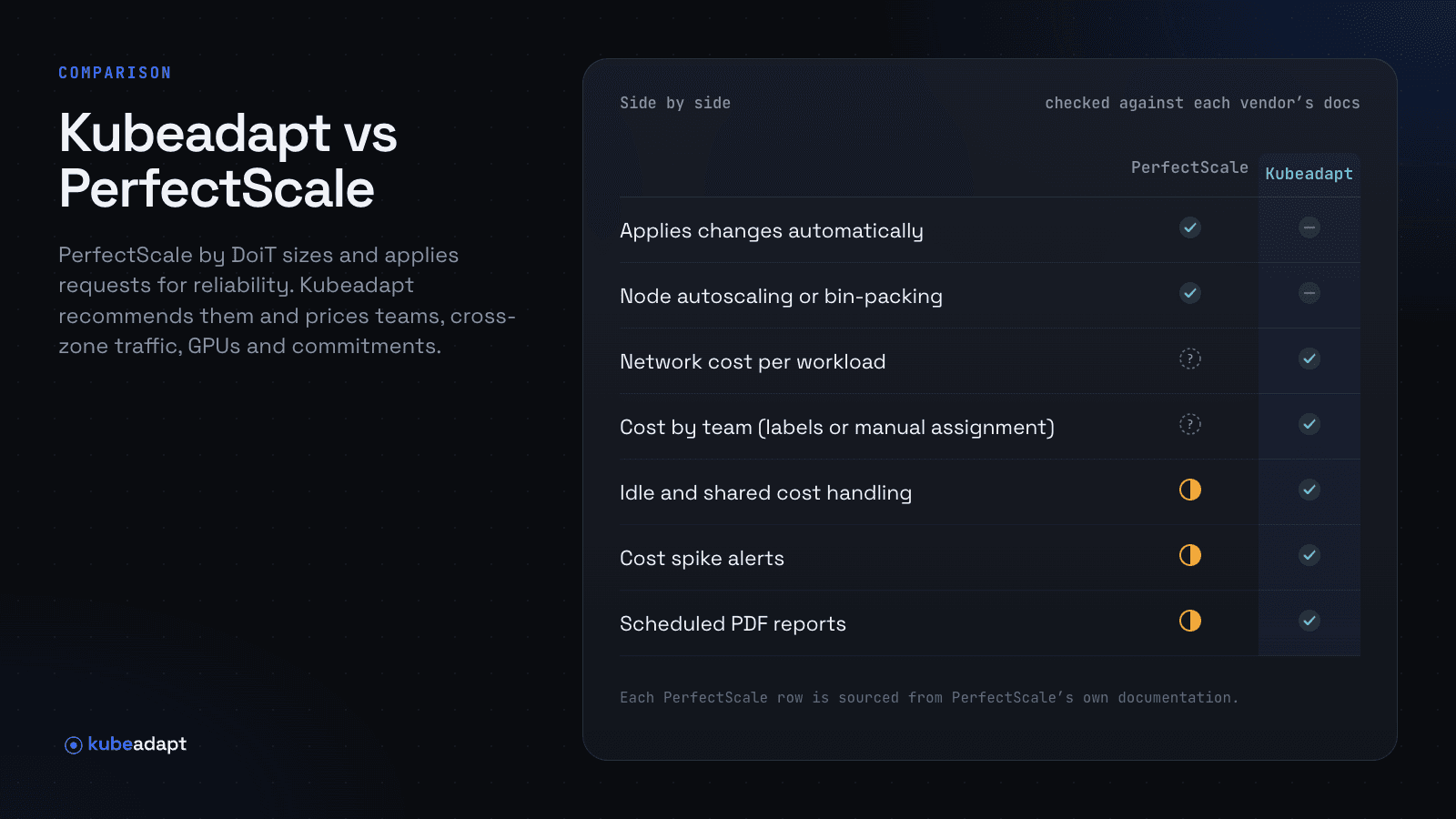
Side by side
| PerfectScale | Kubeadapt | |
|---|---|---|
| Rightsizing recommendations | Yeswith OOM, throttling and eviction risk | Yesrequests and limits, as YAML |
| HPA-aware rightsizing | Yesalso sets HPA minReplicas and targets | Yes |
| Applies changes automatically | Yesrequests and HPAs, in place on 1.33+ | Norecommends only |
| Node autoscaling or bin-packing | Yesbin packing, Karpenter consolidation | No |
| Self-hosted option | Yesmanaged SaaS or self-hosted | NoSaaS only |
| Reconciles with the cloud bill | YesAWS, Azure, GCP, on paid plans | YesAWS, Azure, Google Cloud |
| Network cost per workload | Not documented | YeseBPF, measured per pod |
| Cost by team (labels or manual assignment) | Not documented | Yeslabels or manual, with splits |
| Idle and shared cost handling | Partlyidle shown, not spread | Yesidle shown separately |
| Cost spike alerts | Partlythresholds you set | Yeslearned baselines |
| Scheduled PDF reports | Partlyweekly email summary | Yes |
| GPU cost and utilization | Partlyutilization from DCGM | Yes |
| LLM inference cost | Not documented | Yesper model, per 1M tokens |
| Commitment management (Savings Plans, RIs, CUDs) | Not documentedreservation type per node | Yescoverage, utilization, expiries |
| MCP server for AI tools | Partlyagent skill through the pscli CLI | Yeshosted, read-only |
Checked against PerfectScale's documentation and changelog on November 19, 2026. "Not documented" means we could not find it there.
The rightsized service that still costs too much
Take an orders-api with 12 replicas spread evenly over three zones of an EKS cluster in us-east-1. PodFit and Kubeadapt would both tell you its CPU request can come down, and both would check its HPA first. Neither the request nor cAdvisor's byte counters say where the traffic goes. With endpoints spread evenly over three zones, two of every three calls to inventory-api and Redis cross a zone. If the service moves 30,000 GB a month (an example volume), about 20,000 GB of it crosses, and AWS bills $0.01 per GB in each direction, so $0.02 for every GB that crosses: $400 a month. The bill shows it as EC2 data transfer and never names the pod.
Kubeadapt's optional eBPF agent counts that traffic at each pod's own network interface, on Linux kernel 5.10 or newer, so it keeps the real pod address instead of guessing from conntrack or flow logs. In Network Intelligence, Explorer lists orders-api to inventory-api as a cross-zone pair with its bytes and dollars, and the recommendation names the Services that would save money with topology-aware routing: here, trafficDistribution: PreferSameZone (generally available in Kubernetes 1.35, PreferClose on 1.31 to 1.33). The same screens price NAT gateway processing and internet egress per workload. The cross-zone guide works the arithmetic for other cluster shapes.
Splitting the platform namespace across teams
Most clusters have a platform namespace that nobody owns: the ingress controller, a shared Kafka, the observability stack. Say it costs $6,200 a month (an example). PerfectScale reports cost by cluster, namespace and workload, and its weekly email lists cost by namespace with idle included, so you can see that platform is expensive. Its docs do not describe splitting that cost between the teams that use it.
In Kubeadapt, the assignment workbench splits each shared workload across up to 10 teams: Kafka 40/35/25 between checkout, search and payments, the ingress controller by whatever share you agree. Owned namespaces get their team from labels. Fully Loaded spreads shared and idle cost over the workloads that use the cluster; Workload Only leaves them out, and idle cost stays visible as its own number either way. The Executive report (5 pages, cost by team included) goes to finance by email or Slack each month, and the Engineering report (6 to 13 pages) gives engineers workloads, rightsizing, nodes, network and savings with dates. See cost allocation for the method.
Sizing the Savings Plan after the requests come down
Rightsizing and commitments pull on the same number. A Savings Plan bought on last quarter's usage commits you to a dollar amount per hour for the whole term. For example, if you commit to $25 an hour of compute and rightsizing brings eligible usage down to $18 an hour, the $7 an hour you no longer use costs $61,320 over a one-year term (8,760 hours).
PerfectScale's billing integration, on its Advanced and Expert plans, prices nodes with your reservations, Savings Plans and credits, and its node view shows each node's reservation type. Its docs do not cover commitment coverage, utilization or expiry dates. Kubeadapt's Commitment Manager tracks all three for Savings Plans, Reserved Instances and committed use discounts, sizes new commitments from the steady baseline of your Kubernetes usage rather than its peak, and shows which workloads consume each commitment. It recommends; it does not buy commitments.
GPU nodes need a dollar figure next to the utilization
PerfectScale reads GPU and GPU memory utilization per container from NVIDIA DCGM and labels each workload's scheduler and sharing type. GPU & LLM Observability in Kubeadapt reads the same DCGM Exporter metrics and adds cost: per GPU, pod, workload and team, with MIG slices and time-sliced GPUs costed separately, and idle or under-used GPUs listed with what they cost. For self-hosted models on vLLM, NVIDIA Triton or Text Generation Inference, it shows cost per model deployment and per million tokens, with throughput and latency beside it. For example, a deployment that costs $2,900 a month and serves 1.6 billion tokens costs about $1.81 per million.
Spend on GPU nodes swings with training schedules, so a fixed threshold either pages every night or misses the weekend a job forgot to stop. Smart Alerting learns each scope's normal range by hour of day, opens an incident when spend stays outside it, and names the workloads that drove it.
Where PerfectScale is stronger
- It applies the change. The automation raises resources at once when a workload is at risk, lowers waste step by step with a check after each step, and records every change in an audit log. On Kubernetes 1.33 and later it resizes pods in place. Kubeadapt recommends only; someone on your team applies each patch.
- Its rightsizing is built around risk. PodFit flags OOM kills, CPU throttling, evictions, restarts, HPAs at max replicas, suspected memory leaks and CPU runaways, and the automation raises memory limits after an OOM kill.
- It also automates the node side. Since November 13, 2026 it adjusts HPA minReplicas and utilization targets, adjusts Karpenter disruption budgets so node consolidation can proceed, and runs bin packing that drains blocked nodes and removes the emptied ones. Kubeadapt recommends node layouts and does not move pods or remove nodes.
- You can run it yourself. PerfectScale deploys as managed SaaS or self-hosted, and DoiT Cloud Intelligence customers can add it to their account. Kubeadapt is SaaS only, hosted in the EU.
Moving from PerfectScale
Install Kubeadapt's Helm chart next to the PerfectScale exporter; cost per workload appears in about 5 minutes, and rightsizing recommendations after about 7 days of minute-level data. In week one, compare cost per namespace. The figures will differ: PerfectScale charges each workload the maximum of allocated or used (p90) resources and does not spread leftover node headroom, while Kubeadapt charges each container the greater of its request and its usage every minute, and in Fully Loaded spreads idle and shared cost. Workload Only is the closer match. Connect your CUR 2.0 export and check one month against the invoice. If you turn PerfectScale's automation off, requests change only when your team ships a patch, from the YAML on the recommendation or through Claude Code, which can read the recommendation through Kubeadapt MCP and open the pull request. If you keep it on, leave those workloads' requests to PerfectScale and use Kubeadapt for the cost around them.
Install Kubeadapt on one cluster, or book a demo to see Network Intelligence and Commitment Manager on your own data.
Sources
- DoiT: DoiT acquires PerfectScale (2025-02-04)
- PerfectScale: Changelog
- PerfectScale: PodFit, vertical pod right-sizing
- PerfectScale: Combining vertical (PodFit) and horizontal (HPA) optimization
- PerfectScale: Introduction to automation
- PerfectScale: About cloud billing integration
- PerfectScale: GPU optimization
- PerfectScale: Data collected
- PerfectScale: Weekly Report
- PerfectScale: Agent skill
- PerfectScale: Overview (managed SaaS or self-hosted)
- PerfectScale: Understanding At Risk indicators
- PerfectScale: In-place workload right-sizing
- Kubeadapt: How costs are computed
- Kubeadapt: eBPF agent