ScaleOps is a self-hosted platform that sizes Kubernetes resources for you. It runs inside your cluster, air-gapped if you need it, rightsizes requests continuously with in-place resize, tunes replicas alongside HPA and KEDA, consolidates nodes, places spot replicas and shares GPUs, and in March 2026 it raised a $130 million Series C to build out its AI infrastructure products. Kubeadapt covers the parts of the Kubernetes bill that pod sizes do not decide: traffic between zones and out of the VPC, each team's share of a shared cluster, and spend that jumps overnight. It recommends changes and does not apply them, and it runs only as a hosted service in the EU.
The short version
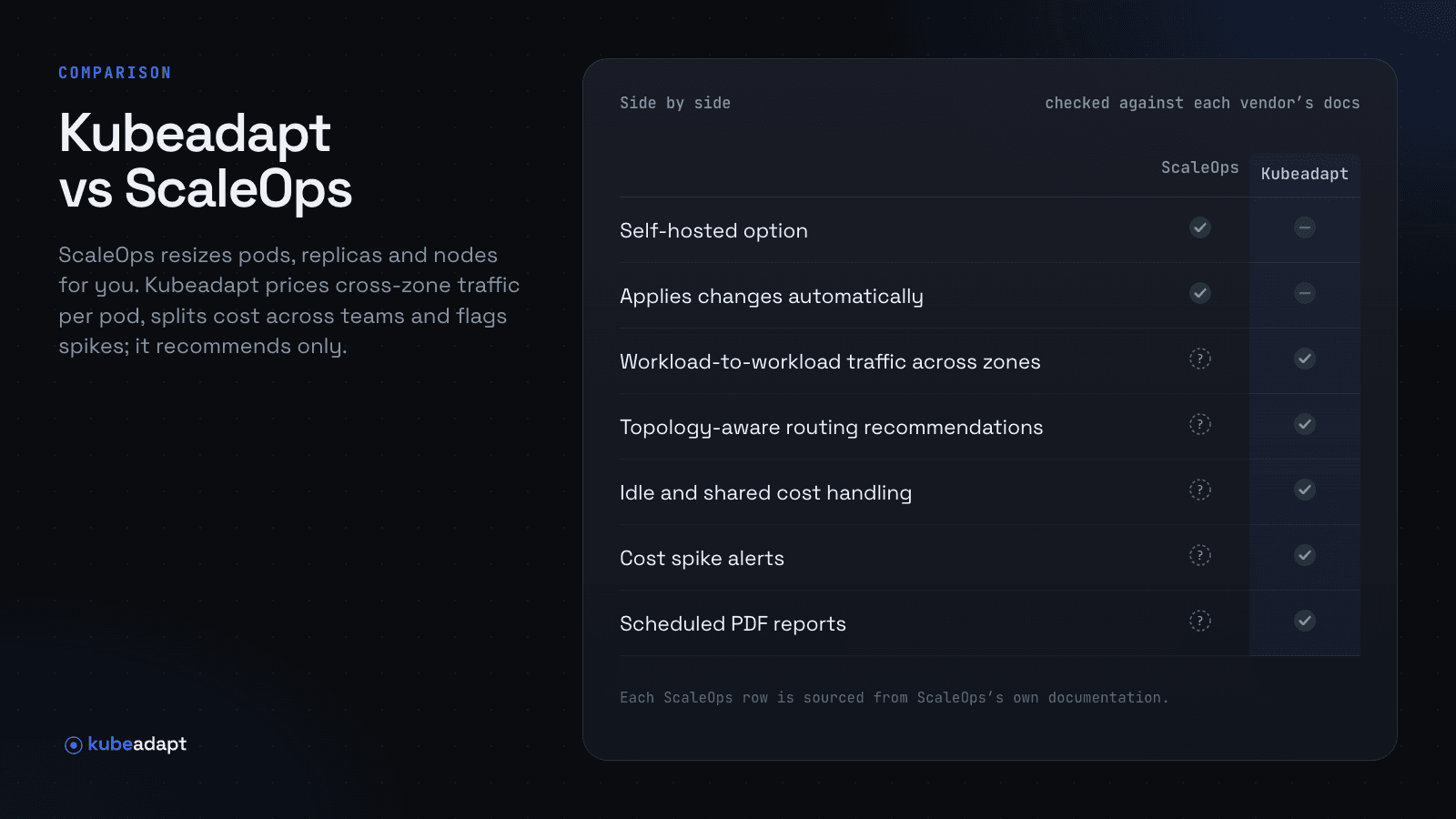
ScaleOps decides how big each pod should be and makes the change. Kubeadapt measures network cost per pod with eBPF, shows which workloads talk across zones, and names the Services that would save money with topology-aware routing. It splits shared workloads across up to 10 teams, keeps idle cost as its own number, fires cost spike alerts against a baseline learned for each hour of the day, and sends Executive and Engineering reports on a schedule. If you want pod resources managed for you, or a platform that runs inside an air-gapped cluster, ScaleOps does that and Kubeadapt does not.
Side by side
| ScaleOps | Kubeadapt | |
|---|---|---|
| Runs as | Self-hosted in your cluster, or ScaleOps Cloud | Hosted SaaS (EU), one Helm chart |
| Self-hosted option | Yesincluding air-gapped | NoSaaS only |
| Applies changes automatically | Yespods, replicas and nodes | Norecommends only |
| Node autoscaling or bin-packing | Yesconsolidation, Karpenter, spot | No |
| Rightsizing recommendations | Yescontinuous, in-place resize | Yesrequests and limits, as YAML |
| HPA-aware rightsizing | Yesalongside HPA and KEDA | Yes |
| GPU cost and utilization | Yesplus fractional GPU sharing | Yes |
| Network cost per workload | Yesby workload; method not published | YeseBPF, measured per pod |
| Workload-to-workload traffic across zones | Not documented | Yes |
| Topology-aware routing recommendations | Not documented | Yes |
| Cost by team (labels or manual assignment) | Yesteam, app, label, annotation | Yeslabels or manual, with splits |
| Idle and shared cost handling | Not documented | Yesidle shown separately |
| Reconciles with the cloud bill | YesAWS, Google Cloud and Azure billing | YesAWS, Azure, Google Cloud |
| Cost spike alerts | Not documented | Yeslearned baselines |
| Scheduled PDF reports | Not documented | Yes |
| MCP server for AI tools | Yesreads and takes actions | Yeshosted, read-only |
Checked against ScaleOps' public product pages on November 19, 2026; its technical documentation requires a login. "Not documented" means we could not find it there.
Cross-zone traffic that pod sizes do not touch
Rightsizing lowers what a pod reserves. The bytes it sends stay the same. In a three-zone cluster where a Service's endpoints sit evenly across zones, about 67% of its requests cross a zone (1 − 1/3), and AWS bills $0.01 per GB in each direction, so $0.02 for every GB that crosses. Example: 25 TB a month of Service traffic crossing zones is 25,000 GB × $0.02 = $500 a month, and it is still $500 after every pod on the path has been rightsized.
ScaleOps' cost page says you can "drill into GPU and network costs by workload". It does not say how the traffic is measured or which charges it covers.
Kubeadapt's eBPF agent counts traffic at each pod's own network interface, so each byte keeps the address of the pod that sent it. In Network Intelligence, Explorer shows who talks to whom across zones, and Kubeadapt names the Services that would save money with topology-aware routing, with the monthly figure for each. The fix is one field on the Service, trafficDistribution: PreferSameZone, beta in Kubernetes 1.34 and generally available in 1.35; on 1.31 to 1.33 the same behavior is called PreferClose. The topology-aware routing guide covers when it is safe to turn on.
Where an automated saving lands on each team's line
ScaleOps breaks cost down by cluster, namespace, team, application, label and annotation, matches it to the invoice through AWS CUR, the Google Cloud billing export and Azure Cost Management, and shows savings as before-and-after comparisons. Its public pages do not describe how idle and shared capacity are handled, and idle capacity is where an automated saving goes first.
A lower request does not lower the node bill by itself. The nodes cost the same until pods are packed onto fewer of them and the spare ones are removed, and in between, the capacity the requests gave back sits idle. Example: ScaleOps trims requests across 300 workloads by 120 vCPU in total, on nodes that work out to $0.04 per vCPU-hour (example figures). That is 120 × $0.04 × 730 hours = $3,504 a month of capacity that moves from the teams' requests into idle until node consolidation catches up.
Kubeadapt shows both sides of that move. In the Workload Only view, each team's line falls the day its requests do, and idle cost rises as its own number. In the Fully Loaded view, idle is spread back over workloads, so team totals add up to the cluster bill and fall as nodes leave. Teams come from labels or the assignment workbench, a shared workload can be split across up to 10 teams, and teams roll up into departments for showback and chargeback. Each step of the calculation is public in How costs are computed, and the Executive report carries cost by team to managers and finance by email or Slack on your schedule.
A jump in spend at 02:00 next to the nightly batch
Continuous automation changes cost all day: replica counts follow demand, nodes are consolidated and pods are resized, so spend has a daily shape of its own. ScaleOps lets you compare two periods side by side; cost alerts are not described on its public pages.
Kubeadapt's cost spike alert learns a normal range for each scope from its own history, by hour of day, so the batch job that runs every night at 02:00 does not page anyone. When spend leaves that range and stays out by more than a minimum dollar amount, Smart Alerting opens an incident that says what changed and which workloads drove it, and sends it to Slack, email, a webhook or the app. Example: a new search indexer starts at 02:00 on a Tuesday and adds $90 an hour on top of the batch window. The incident names the indexer and its namespace and shows the band it broke. Anyone on the team can then ask Kubeadapt AI how the namespace's cost moved this week and get the chart with the answer. Budget alerts at 50, 80, 90 and 100% of a budget catch the slower drift.
Where ScaleOps is stronger
ScaleOps applies its decisions, and Kubeadapt does not. It starts in read-only mode; once you turn automation on, it rightsizes requests continuously from each workload's live behavior, in place where Kubernetes allows, while HPA and KEDA keep managing replica counts. It heals pods on CPU throttling, OOM kills and node pressure, and raises CPU requests while pods start. Its MCP server takes actions from a chat in Claude, Cursor or Codex: "approve a rightsizing recommendation, update a policy, or resolve an eviction". Kubeadapt gives a recommendation with a YAML patch, and your team applies it.
It works on nodes and GPUs too. Node optimization replaces underutilized nodes with types that fit the running pods and works with the Kubernetes Cluster Autoscaler; further modules optimize Karpenter and spot placement, and fractional GPUs let self-hosted inference pods share a GPU. Kubeadapt reports GPU cost and idle GPUs; it does not consolidate nodes or share GPUs.
It runs where Kubeadapt cannot. ScaleOps is fully self-hosted: one Helm command, no external dependencies, air-gapped with full functionality, FIPS-compatible, and data stored in the cluster, on EKS, GKE, AKS, OpenShift, Rancher, Oracle Cloud and Alibaba. Kubeadapt is hosted SaaS in the EU, so a cluster that may not send data out cannot use it.
Running both
ScaleOps sizes the pods; Kubeadapt shows what they and their traffic cost, and who owns each dollar. Install the Kubeadapt agent with Helm next to ScaleOps. The agent sends snapshots out over HTTPS with a per-cluster token, nothing connects into the cluster, and cost appears in about 5 minutes. Add the eBPF agent on nodes with Linux kernel 5.10 or newer for network cost.
Let ScaleOps keep the requests for the workloads it automates and treat Kubeadapt's recommendations there as a cross-check; they appear after about 7 days of data. For workloads ScaleOps does not manage, apply Kubeadapt's patch, or connect Kubeadapt MCP and ask Claude Code to write it into your repository as a pull request. In the first month, compare ScaleOps' savings view with Cost Explorer for the same namespaces, open Explorer to find the cross-zone Services, and schedule the Executive report for finance.
The quick start takes one Helm command, and the demo shows the same screens on a live cluster.
Sources
- ScaleOps: Platform overview
- ScaleOps: Self-hosted platform
- ScaleOps: Kubernetes cost monitoring
- ScaleOps: Automated pod rightsizing
- ScaleOps: Node optimization
- ScaleOps: Automated fractional GPUs
- ScaleOps MCP
- AWS Marketplace: ScaleOps
- TechCrunch: ScaleOps raises $130M Series C (2026-03-30)
- Kubeadapt: How costs are computed
- Kubeadapt: Smart Alerting