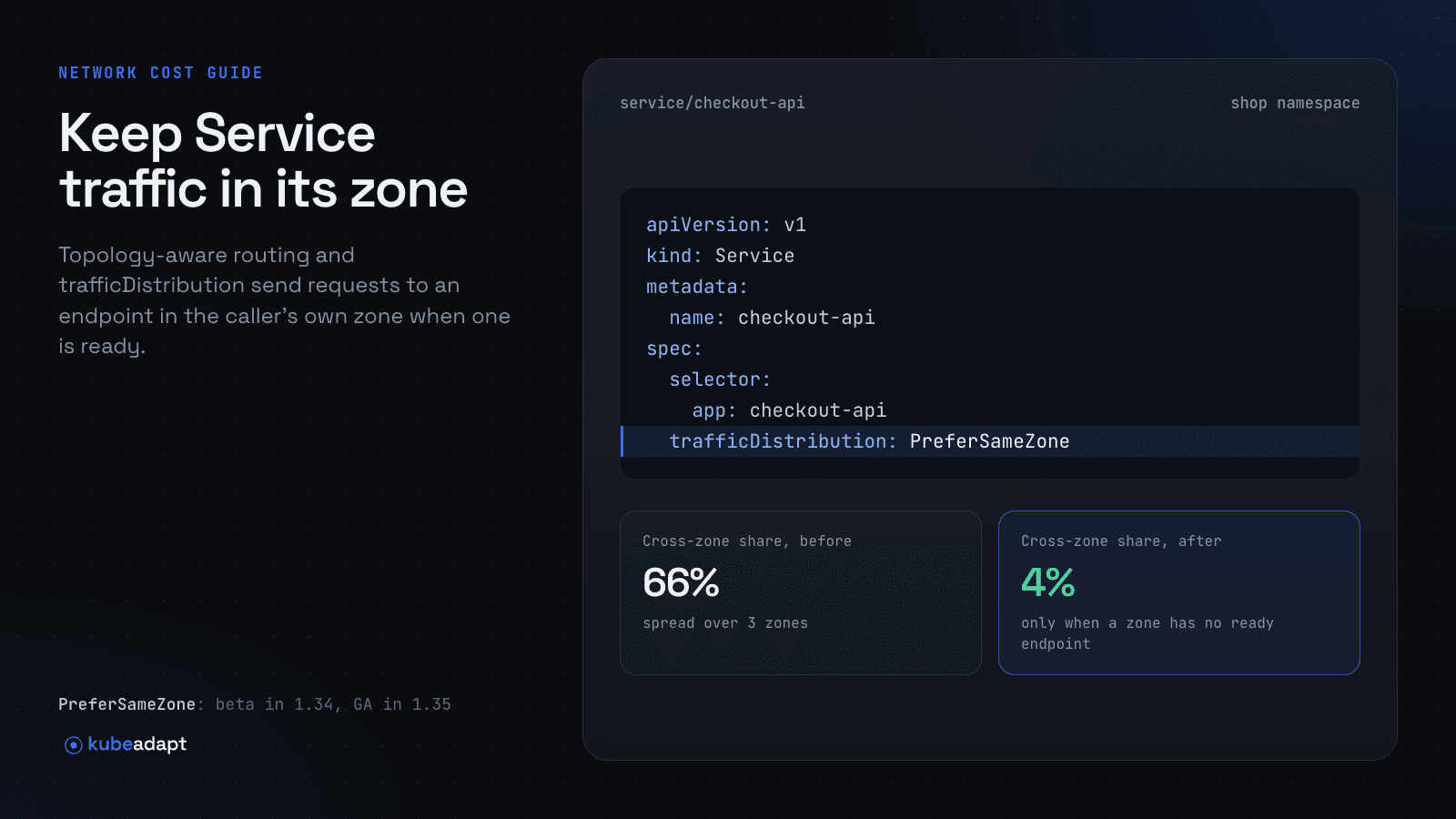
Topology-aware routing makes a Kubernetes Service send each request to an endpoint in the caller's own zone (or node) when one is ready, instead of spreading requests across the whole cluster. On current clusters you turn it on with one field, spec.trafficDistribution: PreferSameZone, which is generally available since Kubernetes 1.35 (its older spelling, PreferClose, has been GA since 1.33).
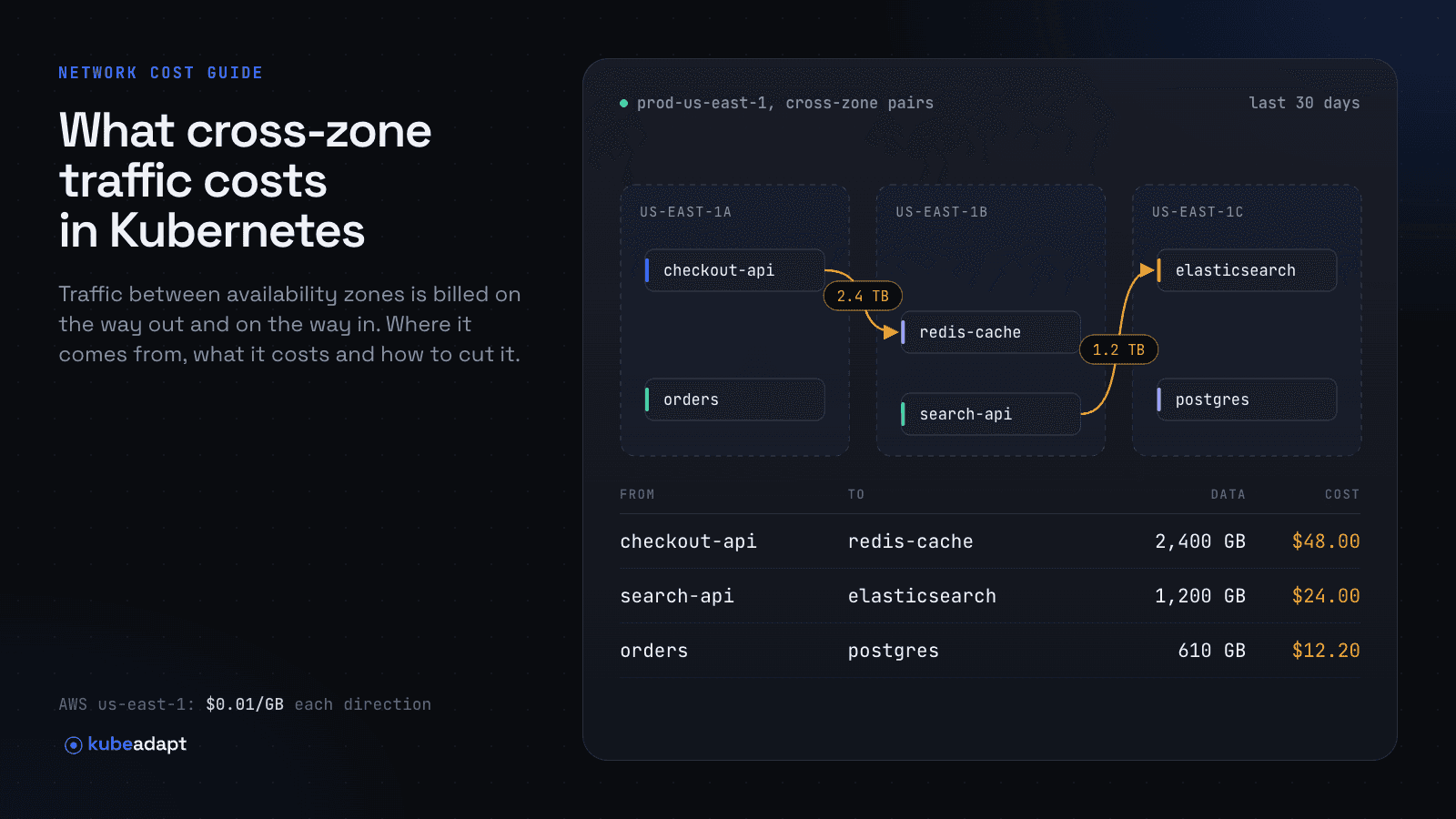
That matters for cost because cross-zone traffic is billed: $0.02 per GB crossing on AWS and $0.01/GiB on Google Cloud as of October 2026 (see Kubernetes cross-AZ data transfer cost). This guide covers every option, which Kubernetes version supports it, YAML you can copy, the failure modes and how to confirm it is working.
What is topology-aware routing in Kubernetes?
Topology-aware routing is a set of Service features that let the service proxy prefer endpoints that are topologically close to the client. Without it, "the default strategy is to distribute traffic evenly to all endpoints in the cluster," according to the Kubernetes Service proxy reference.
The mechanism is EndpointSlice hints. The EndpointSlice controller writes a hints field on each endpoint (for example forZones: [{name: us-east-1a}]), and kube-proxy on each node keeps only the endpoints hinted for its own zone or node. The term covers these settings:
| Setting | What it does | If no local endpoint exists |
|---|---|---|
trafficDistribution: PreferSameZone | Sends traffic to endpoints in the client's zone | Falls back to all endpoints in the cluster |
trafficDistribution: PreferSameNode | Sends traffic to endpoints on the client's node | Falls back to same zone, then cluster-wide |
trafficDistribution: PreferClose | Deprecated alias for PreferSameZone | Same as PreferSameZone |
Annotation service.kubernetes.io/topology-mode: Auto | Allocates endpoints to zones in proportion to each zone's allocatable CPU | Hints are removed and traffic goes cluster-wide when safeguards fail |
internalTrafficPolicy: Local | Uses only endpoints on the client's node | Traffic is dropped |
Which Kubernetes version supports each option?
trafficDistribution with PreferClose is GA from Kubernetes 1.33, and PreferSameZone/PreferSameNode are GA from 1.35 and on by default from 1.34. The table is built from the Kubernetes feature gate reference and the KEPs listed in the sources.
| Version | Change | Feature gate |
|---|---|---|
| 1.21 | internalTrafficPolicy alpha; Topology Aware Hints alpha | ServiceInternalTrafficPolicy, TopologyAwareHints |
| 1.22 | internalTrafficPolicy beta, on by default | ServiceInternalTrafficPolicy |
| 1.23 | Topology Aware Hints beta, off by default | TopologyAwareHints |
| 1.24 | Topology Aware Hints on by default | TopologyAwareHints |
| 1.26 | internalTrafficPolicy GA | ServiceInternalTrafficPolicy |
| 1.27 | Annotation renamed from service.kubernetes.io/topology-aware-hints to service.kubernetes.io/topology-mode | n/a |
| 1.30 | trafficDistribution alpha (PreferClose) | ServiceTrafficDistribution |
| 1.31 | trafficDistribution beta, on by default | ServiceTrafficDistribution |
| 1.33 | trafficDistribution GA; Topology Aware Hints GA; PreferSameZone and PreferSameNode alpha | ServiceTrafficDistribution, TopologyAwareHints, PreferSameTrafficDistribution |
| 1.34 | PreferSameZone and PreferSameNode beta, on by default | PreferSameTrafficDistribution |
| 1.35 | PreferSameZone and PreferSameNode GA | PreferSameTrafficDistribution |
The feature gates are needed on kube-apiserver, kube-controller-manager and kube-proxy, per KEP-4444 and KEP-3015. On a managed service you only control the cluster version, so in practice: use PreferClose on 1.31 to 1.33, and PreferSameZone on 1.34 and later. KEP-3015 made PreferClose "a deprecated alias for PreferSameZone," so existing manifests keep working.
How do I keep Service traffic in the same zone?
Set spec.trafficDistribution: PreferSameZone on the Service and make sure every zone has ready endpoints. The Kubernetes docs describe the behavior plainly: if there are endpoints in the zone, they receive all traffic for that zone; if a zone has none, its traffic goes to other zones.
1apiVersion: v1
2kind: Service
3metadata:
4  name: inventory
5  namespace: shop
6spec:
7  selector:
8    app: inventory
9  ports:
10    - port: 80
11      targetPort: 8080
12      protocol: TCP
13  trafficDistribution: PreferSameZone   # use PreferClose on 1.31-1.33
Pair it with a topology spread constraint so each zone gets replicas. The Kubernetes docs recommend this to avoid overloading the endpoints in a busy zone.
1apiVersion: apps/v1
2kind: Deployment
3metadata:
4  name: inventory
5  namespace: shop
6spec:
7  replicas: 6
8  selector:
9    matchLabels:
10      app: inventory
11  template:
12    metadata:
13      labels:
14        app: inventory
15    spec:
16      topologySpreadConstraints:
17        - maxSkew: 1
18          topologyKey: topology.kubernetes.io/zone
19          whenUnsatisfiable: DoNotSchedule
20          labelSelector:
21            matchLabels:
22              app: inventory
23      containers:
24        - name: inventory
25          image: registry.example.com/inventory:1.0.0
26          ports:
27            - containerPort: 8080
For a node-local backend such as a cache or agent run as a DaemonSet, use PreferSameNode. Traffic stays on the node and falls back to the same zone, then the cluster, if the local pod is not ready.
1apiVersion: v1
2kind: Service
3metadata:
4  name: local-cache
5  namespace: platform
6spec:
7  selector:
8    app: local-cache
9  ports:
10    - port: 6379
11      targetPort: 6379
12  trafficDistribution: PreferSameNode   # Kubernetes 1.34+
How does topology-mode: Auto work, and when are hints disabled?
The service.kubernetes.io/topology-mode: Auto annotation asks the EndpointSlice controller to allocate endpoints to zones in proportion to the allocatable CPU of the nodes in each zone. It tries to balance load, so it sometimes assigns an endpoint to a different zone, and some traffic still crosses.
The Topology Aware Routing docs list safeguards that make the control plane or kube-proxy ignore hints and route cluster-wide:
- Fewer endpoints than zones. The controller assigns no hints.
- A balanced allocation is impossible. If the expected overload for a zone exceeds a threshold, no hints are set.
- A node lacks information. Any node without a
topology.kubernetes.io/zonelabel or allocatable CPU disables hints. - An endpoint has no zone hint. kube-proxy assumes a transition is underway and uses all endpoints.
- A zone is not represented. If kube-proxy finds no endpoint hinted for its zone, it uses all endpoints.
The docs add that with fewer than three endpoints per zone, there is roughly a 50% chance the controller cannot allocate evenly and falls back to cluster-wide routing. In a three-zone cluster that means nine or more endpoints.
If the annotation is set to Auto, it takes precedence over trafficDistribution, and the docs say it "may be deprecated in the future." For new Services, prefer trafficDistribution: it is simpler and predictable, and you manage endpoint capacity yourself.
When should I use internalTrafficPolicy: Local?
Use internalTrafficPolicy: Local only when a client must reach the copy of a service on its own node and should fail rather than leave the node. Kubernetes routes in-cluster traffic only to node-local endpoints, and "if there are no node-local endpoints, traffic is dropped by kube-proxy."
1apiVersion: v1
2kind: Service
3metadata:
4  name: node-agent
5spec:
6  selector:
7    app: node-agent
8  ports:
9    - port: 9000
10      targetPort: 9000
11  internalTrafficPolicy: Local
It wins over trafficDistribution when both are set, and Topology Aware Hints are not used on a Service with internalTrafficPolicy: Local. For most cost work, PreferSameNode gives the same locality with a safe fallback.
What can go wrong with zone-local routing?
The main risk is overload. Zone-local routing sends a zone's traffic only to that zone's endpoints, "even if this means that some endpoints receive much more traffic than other endpoints," per the Kubernetes docs.
- Uneven traffic or capacity per zone. If one zone receives most of the calls, for example because an ingress or a large client runs there, that zone's pods take most of the load.
- HPA scales the wrong zone. A single Horizontal Pod Autoscaler watches average utilization across all pods. The EKS best practices guide notes that it may add pods in other zones, which does not relieve the hot zone, and that Karpenter may then add nodes there. Its suggested fix is one Deployment and HPA per zone, plus topology spread constraints.
- Rolling updates and fallbacks. While a zone has no ready endpoint, its traffic goes cluster-wide and is billed as cross-zone again. Short windows are normal; long ones show up in the bill.
- Your dataplane must honor hints. kube-proxy reads EndpointSlice hints. If Cilium replaces kube-proxy, set
loadBalancer.serviceTopology=true, as its documentation describes. Service mesh sidecars do their own load balancing, so check the mesh's locality settings. - It does not affect non-Service traffic. Pods that connect to database replicas, brokers or external IPs directly bypass Service routing. See stateful workloads and cross-zone traffic. Traffic leaving the cluster has its own costs, covered in EKS NAT gateway cost and Kubernetes internet egress cost.
How do load balancers and externalTrafficPolicy affect cross-zone traffic?
Traffic from outside the cluster can cross zones twice: once inside the load balancer and once at the node. Each hop is a separate setting.
externalTrafficPolicy. With the default Cluster, a node that receives load balancer traffic may forward it to a pod on another node, which the Kubernetes docs call "a second hop." Local "preserves the client source IP and avoids a second hop," but risks uneven spreading because nodes without a ready pod fail the health check.
1apiVersion: v1
2kind: Service
3metadata:
4  name: web
5  annotations:
6    service.beta.kubernetes.io/aws-load-balancer-type: external
7    service.beta.kubernetes.io/aws-load-balancer-nlb-target-type: ip
8spec:
9  type: LoadBalancer
10  externalTrafficPolicy: Local
11  selector:
12    app: web
13  ports:
14    - port: 443
15      targetPort: 8443
Target type on AWS. With the AWS Load Balancer Controller, ip mode sends traffic from the load balancer straight to pod IPs, while instance mode goes through a NodePort and kube-proxy. The EKS best practices guide recommends ip mode to reduce data transfer charges.
Cross-zone load balancing on AWS. The rules differ by load balancer type:
| Load balancer | Cross-zone default | Data transfer between load balancer and targets in other zones |
|---|---|---|
| Application Load Balancer | Always on at the load balancer level; can be turned off per target group | Free over private IPs in the same VPC (EC2 pricing page) |
| Network Load Balancer | Off | "EC2 data transfer charges apply" when you enable it |
With the AWS Load Balancer Controller, the NLB setting is service.beta.kubernetes.io/aws-load-balancer-attributes: load_balancing.cross_zone.enabled=true. Leave it off unless one zone can hold too few targets, and make sure every enabled zone has targets, since AWS treats an empty zone as unhealthy when cross-zone is off.
How do I verify topology-aware routing is working?
Check three things: the hints exist, nothing disabled them, and the cross-zone bytes actually dropped. Start with the EndpointSlices.
kubectl get endpointslices -n shop -l kubernetes.io/service-name=inventory \
  -o jsonpath='{range .items[*].endpoints[*]}{.addresses[0]}{"\t"}{.zone}{"\t"}{.hints.forZones[*].name}{"\t"}{.hints.forNodes[*].name}{"\n"}{end}'
Each ready endpoint should print its zone and a matching forZones hint (PreferSameZone) or a forNodes hint (PreferSameNode). Empty hint columns mean the proxy will route cluster-wide.
For the topology-mode: Auto annotation, the EndpointSlice controller records events on the Service when it enables or disables hints, with messages such as "Insufficient number of endpoints."
kubectl describe service inventory -n shop | sed -n '/Events:/,$p'
kubectl get nodes -L topology.kubernetes.io/zone
The second command confirms that every node has a zone label, which the safeguards require. KEP-4444 also defines a kube-controller-manager metric, endpoint_slice_controller_services_count_by_traffic_distribution, for counting Services by setting.
Hints only prove intent. To confirm the effect, compare cross-zone bytes for the workload before and after the change, using the methods in how to measure cross-AZ traffic per workload. On AWS, the InterZone-In and InterZone-Out lines in the Cost and Usage Report should fall for the nodes running the client.
With Kubeadapt
Kubeadapt's Network Intelligence shows cross-zone traffic and its cost per workload, so you can pick the Services worth changing and check the result afterwards. The optional eBPF agent, kubeadapt-k8s-pulse, runs one DaemonSet pod per node and counts bytes per connection. Kubeadapt shows the cost and the workloads behind it. It never changes Service settings or workloads for you. See Network Intelligence and the eBPF agent docs.
Sources
- Kubernetes: Virtual IPs and Service Proxies (traffic policies and traffic distribution)
- Kubernetes: Topology Aware Routing
- Kubernetes: Service Internal Traffic Policy
- Kubernetes: Feature gates reference
- Kubernetes: Create an External Load Balancer (preserving the client source IP)
- KEP-4444: Traffic Distribution for Services
- KEP-3015: PreferSameZone and PreferSameNode Traffic Distribution
- KEP-2433: Topology Aware Hints
- Amazon EKS Best Practices: Cost Optimization - Networking
- Cilium: Kubernetes without kube-proxy (topology aware hints)
- Elastic Load Balancing: Cross-zone load balancing
- Network Load Balancer: Cross-zone load balancing for target groups
- Amazon EC2 On-Demand Pricing: Data Transfer within the same AWS Region
- AWS Load Balancer Controller: Service annotations