Komodor is a Kubernetes troubleshooting and reliability platform, sold today as an autonomous AI SRE: its Klaudia agent detects failures, traces the root cause through events, logs and configuration history, and can run the fix or open a pull request. Cost is a module beside it, which allocates node cost by requests at public list prices and applies rightsizing and pod placement through an admission controller. Kubeadapt is a cost system, and it does not troubleshoot pods or apply changes. It gives the person who owns the Kubernetes line the figures that person is asked for: what each team spent, how that ties to the invoice, what changed this week, and which change saves the most next.
The short version
If you already run Komodor for on-call, keep it for that. For cost, Kubeadapt ties each workload to the AWS, Azure or Google Cloud bill, with Savings Plans, Reserved Instances and credits on the workload that used them; Komodor's cost docs describe public prices, an EDP percentage you enter, and CUR integration as a plan. Kubeadapt also splits shared workloads across up to 10 teams, alerts when spend leaves the range it learned for each scope, sends Executive and Engineering reports on a schedule, and prices cross-zone and NAT gateway traffic per workload with eBPF. Komodor goes further on keeping clusters healthy, and it applies rightsizing automatically, which Kubeadapt does not: Kubeadapt gives you the YAML patch and your team ships it.
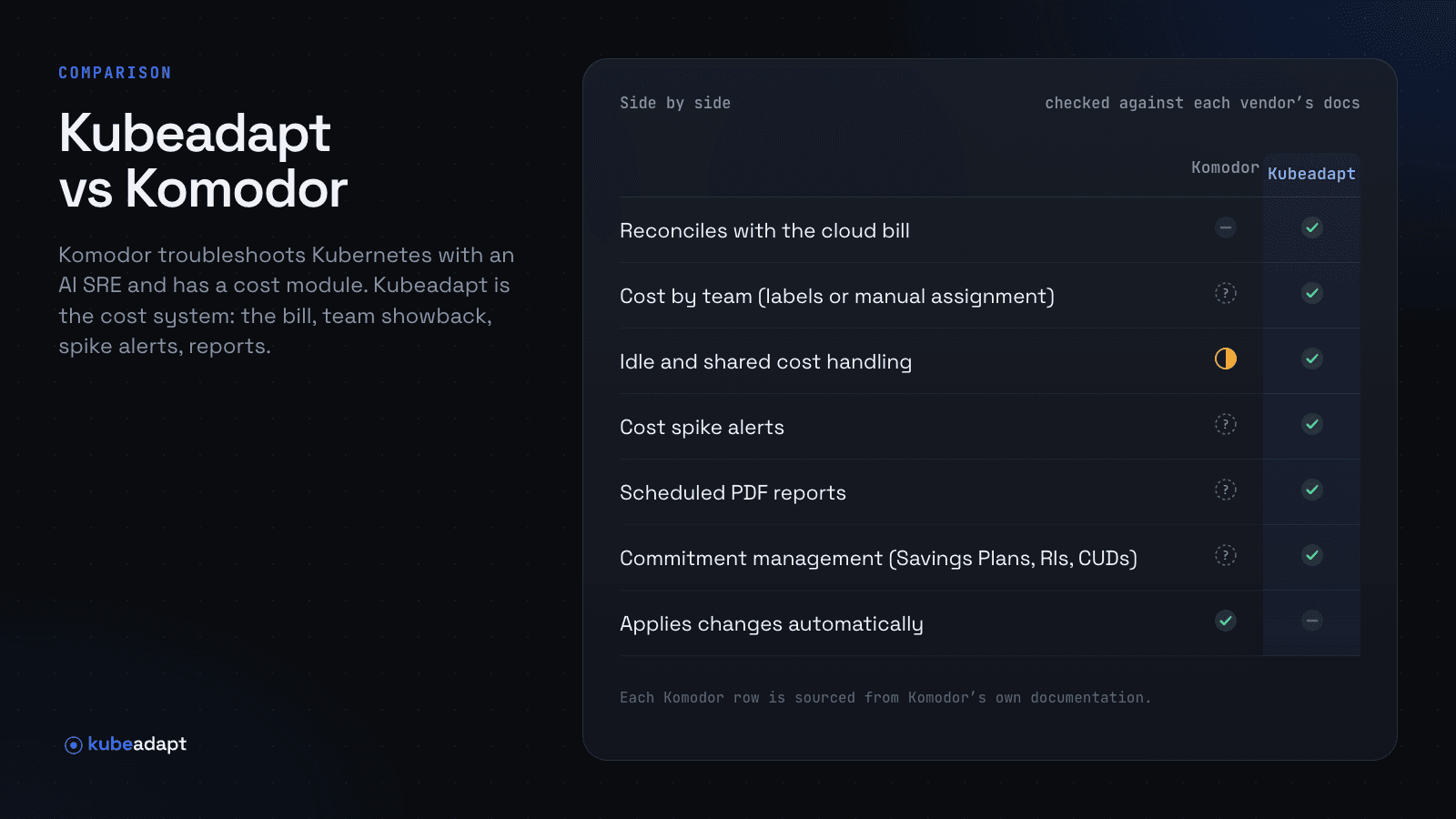
Side by side
| Komodor | Kubeadapt | |
|---|---|---|
| Reconciles with the cloud bill | Nolist prices; CUR integration planned | YesAWS, Azure, Google Cloud |
| Cost by namespace and workload | Yesby namespace and service, from requests | Yesdown to the container, per minute |
| Cost by team (labels or manual assignment) | Not documented | Yeslabels or manual, with splits |
| Idle and shared cost handling | Partlyunallocated shown, not spread | Yesidle shown separately |
| Cost spike alerts | Not documented | Yeslearned baselines |
| Scheduled PDF reports | Not documented | Yes |
| Commitment management (Savings Plans, RIs, CUDs) | Not documentedSavings Plans listed as upcoming | Yescoverage, utilization, expiries |
| Network cost per workload | Not documented | YeseBPF, measured per pod |
| GPU cost and utilization | PartlyGPU cost by requests | Yes |
| Rightsizing recommendations | Yespercentile over a 30-day window | Yesrequests and limits, as YAML |
| HPA-aware rightsizing | Yesrewrites HPAs to AverageValue | Yes |
| Applies changes automatically | Yesadmission controller, in place on 1.33+ | Norecommends only |
| Node autoscaling or bin-packing | Partlypod placement to unblock scale-down | No |
| AI assistant in the product | YesKlaudia, an AI SRE | Yes |
| MCP server for AI tools | Yeshosted Klaudia MCP, in beta | Yeshosted, read-only |
| Alert channels | YesSlack, Teams, OpsGenie, webhook | YesSlack, email, webhook |
Checked against Komodor's help center on November 19, 2026. "Not documented" means we could not find it there.
The month-end number
Komodor's Cost Overview prices AWS nodes from the public price list and spot price history, and Azure and Google Cloud nodes from their retail pricing APIs. You can enter an EDP discount per cloud, which starts at 0%, and the same page lists CUR integration ("to get the actual prices you pay") as a plan. Those prices say what the cluster would cost at list. Finance wants what you paid.
For example, take a cluster that costs $40,000 a month at list price, where a Compute Savings Plan at a 30% discount covers 60% of the node hours. The covered $24,000 is billed at $16,800, the other $16,000 at on-demand rates, and compute on the invoice comes to $32,800, which is $7,200 less than the list view. An EDP percentage can close the total, but it moves every workload by the same share, while the discount landed only on the usage the plan covered.
Kubeadapt reads the bill itself. Connect the AWS Cost and Usage Report (CUR 2.0), Azure Cost Management exports or the Google Cloud billing export, and Savings Plans, Reserved Instances, committed use discounts, spot prices, negotiated discounts and credits land on the workload that used them. Commitment Manager tracks each plan's coverage, utilization and expiry date, shows which workloads consume it, and sizes the next one from the steady baseline of your Kubernetes usage instead of its peak. It recommends commitments; it does not buy them.
A cost incident with every pod healthy
A pull request changes the reindex CronJob from 0 2 * * * to 0 * * * *. Every run succeeds. Say one run costs $11 (an example): the job went from $11 a day to $264, about $7,600 more a month. None of Komodor's documented monitor types (availability, deploy, node, PVC, job, CronJob and workflow pod) watches spend, and its cost pages describe no spend alert.
Kubeadapt's cost spike alert compares each scope's spend with a range it learned from that scope's own history, by hour of day. The 02:00 run is part of normal; 23 extra runs a day are not. When spend stays outside the range, Smart Alerting opens an incident that shows the expected range next to what happened and names reindex as the workload that drove it, in Slack, email, a webhook or the in-app inbox. Budget alerts watch the planned figure per cluster, namespace, team or department.
Showback that finance can sign off
Komodor's Cost Allocation table lists cost per cluster, namespace and service, shows unallocated capacity as its own row, and exports the table. A chargeback also needs owners: the shared ingress controller split across the teams behind it, idle cost either spread or kept apart, and one figure per team that ties to the invoice. Komodor's docs do not describe grouping cost by team.
In Kubeadapt, teams and departments come from labels or the assignment workbench, and one workload can be split across up to 10 teams. Fully Loaded spreads idle and shared cost over the workloads; Workload Only leaves them out, and idle cost is always shown as its own number. Finance gets the Executive report on a schedule by email or Slack: five pages on what was spent, how it changed, what drove it and what each team cost. Engineers get the Engineering report, 6 to 13 pages of workloads, rightsizing, nodes, network cost and savings with dates. The FOCUS 1.4 export carries the same figures to finance tools as CSV or Parquet. The cost allocation guide explains the method.
What Klaudia answers, and what Kubeadapt AI answers
Klaudia is built for "why is this broken": it correlates events, logs and configuration changes across clusters, and its MCP server's 14 tools center on cluster visibility, health risks and root cause analysis, with two for rightsizing recommendations. Kubeadapt AI is built for "why did this cost more": ask why payments spent more in October than in September and it answers from your cost data and draws the chart. From Claude Code, Cursor or ChatGPT, Kubeadapt MCP gives the same data through one hosted URL with 23 read-only tools, OAuth sign-in with SSO, and only the clusters each user may see. Every answer says whether its number is measured, estimated, partial, stale or a lower bound.
Where Komodor is stronger
- Troubleshooting. Klaudia detects availability issues, finds the root cause by correlating events, logs, configuration history and signals from other clusters, and fixes it within your RBAC or opens a Git pull request, from the UI, Slack, the API or MCP. Kubeadapt does not troubleshoot pods.
- Reliability monitoring. Real-time monitors cover availability, deploys, nodes, PVCs, jobs, CronJobs and workflow pods, and alert through Slack, Microsoft Teams, OpsGenie, Squadcast, Datadog or a webhook.
- Rightsizing that applies itself. The admission controller sets requests on each pod as it is created, so Deployments in Git stay as they are, and on Kubernetes 1.33 and later it can resize running pods in place. For HPA workloads it first switches the metric to
AverageValueso scaling holds when requests change. Kubeadapt recommends; your team applies each patch. - Node consolidation. Intelligent Pod Placement groups unevictable pods on dedicated nodes so the rest can scale down, and since June 2026 Capacity Intelligence flags disruption budget conflicts, unevictable pods and anti-affinity rules that block consolidation. Kubeadapt does not move pods or remove nodes.
Komodor for on-call, Kubeadapt for cost
Install Kubeadapt's Helm chart next to the Komodor agent; cost per workload appears in about 5 minutes. Pick one owner for each workload's requests. Where Komodor's automated rightsizing is on, keep it and dismiss Kubeadapt's recommendation for that workload; where it is off, apply Kubeadapt's YAML patch through your usual review. In week one, compare cost per namespace. Komodor allocates by requests, while Kubeadapt charges each container the greater of its request and its usage, so workloads that run above their requests will cost more in Kubeadapt, and once the bill is connected every figure moves to what you paid. Then set a cost spike rule per team and schedule the first Executive report for month end.
Install Kubeadapt on one cluster, or book a demo to walk through your own bill.
Sources
- Komodor: Cost Overview
- Komodor: Cost Allocation
- Komodor: Automatic Workload Rightsizing
- Komodor: HPA rightsizing
- Komodor: In-Place Rightsizing
- Komodor: Intelligent Pod Placement
- Komodor: Real-Time Health Policy Monitors
- Komodor: Klaudia, Cloud-Native AI SRE
- Komodor: Klaudia MCP Server
- Cloud Native Now: Komodor adds Capacity Intelligence and Predictive Placement (2026-06-10)
- Kubeadapt: How costs are computed
- Kubeadapt: Smart Alerting