nOps is a cloud cost platform built around autonomous commitment management. It buys, rebalances and renews Savings Plans, Reserved Instances and committed use discounts on AWS, Azure and Google Cloud, purchasing in small increments as often as hourly, and it charges a percentage of the savings it produces. Its docs show Kubernetes cost as EKS pod and namespace lines from AWS split cost allocation data in your CUR, and its Optimize page adds automated container rightsizing and node optimization on EKS. Kubeadapt covers Kubernetes only and starts inside the cluster: what every container requests, uses and sends over the network, and which workloads consume each commitment.
The short version
nOps answers "how do we pay less for the compute we run", and it does the buying itself. Kubeadapt shows how much compute each workload needs and what it costs: rightsizing with a YAML patch that accounts for the HPA, cross-zone, NAT gateway and egress traffic priced per pod with eBPF, and a Commitment Manager that sizes Savings Plans and RIs from the steady Kubernetes baseline and shows which workloads consume each one. Kubeadapt does not buy commitments or apply changes; your team does both. If you want purchasing and EKS rightsizing automated, nOps does that.
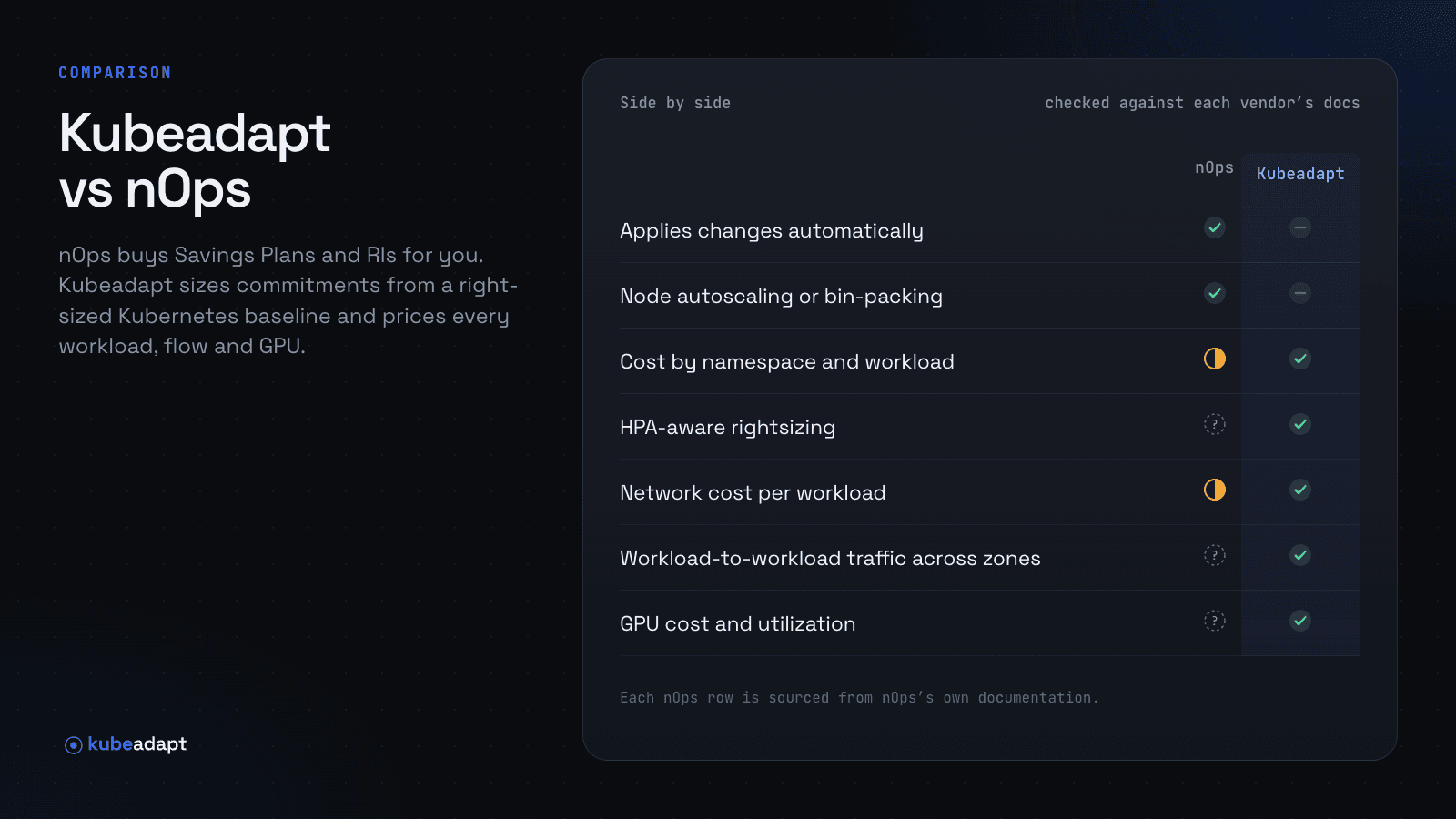
Side by side
| nOps | Kubeadapt | |
|---|---|---|
| Commitment management (Savings Plans, RIs, CUDs) | Yesautomated on AWS, Azure and Google Cloud | Yescoverage, utilization, expiries |
| Applies changes automatically | Yescommitments and EKS rightsizing | Norecommends only |
| Node autoscaling or bin-packing | Yestunes Karpenter and Cluster Autoscaler | No |
| Reconciles with the cloud bill | Yesbuilt on CUR and billing exports | YesAWS, Azure, Google Cloud |
| Cost by namespace and workload | PartlyEKS only, from split cost data | Yesdown to the container, per minute |
| Rightsizing recommendations | YesEKS containers | Yesrequests and limits, as YAML |
| HPA-aware rightsizing | Not documented | Yes |
| Budget alerts | Yesby team, customer or feature | Yes |
| Cost spike alerts | Yesby account, region and usage type | Yeslearned baselines |
| Network cost per workload | PartlyNAT and transfer split by rule | YeseBPF, measured per pod |
| Workload-to-workload traffic across zones | Not documented | Yes |
| GPU cost and utilization | Not documented | Yes |
| Scheduled PDF reports | Partlyscheduled emails, PDF not documented | Yes |
| MCP server for AI tools | YesClara MCP | Yeshosted, read-only |
| Time to first cost data | Yesabout 24 hours | Yesabout 5 minutes |
| Runs as | SaaS; cloud, SaaS and AI bills; EKS agent | Hosted SaaS (EU), one Helm chart |
Checked against nOps's documentation and product pages on November 19, 2026. "Not documented" means we could not find it there.
Size the Savings Plan after the requests are right
In Kubernetes, node hours follow requests, not usage. The scheduler places pods by what they reserve, and the cluster autoscaler or Karpenter adds a node when the reservations stop fitting. A commitment sized from this month's EC2 spend locks in this month's over-requesting.
Take an example EKS cluster that averages 48 m6i.2xlarge nodes (8 vCPU, 32 GiB, $0.384 an hour on demand in us-east-1). That is $18.43 an hour, or $13,455 over a 730-hour month. Suppose that after a week of minute-level data, Kubeadapt's rightsizing recommendations lower the summed CPU and memory requests by about 30%, and the node layout recommendation fits the same pods on 34 nodes. The cluster now costs $13.06 an hour, $9,531 a month: $3,924 less. A Savings Plan sized to the 48-node bill would have committed to 14 nodes the cluster no longer runs.
nOps handles both halves on EKS. Its Optimize page describes container rightsizing applied in one click or continuously, and commitments bought in small increments and adjusted hourly as usage moves, with a credit, subject to its terms, when commitments it manages go unused. Its pages do not mention HPAs.
Kubeadapt's CPU recommendations account for HPA targets, so a lower request does not set off a scale-up that hands the saving back. Commitment Manager tracks coverage, utilization and expiry dates for every Savings Plan, Reserved Instance and committed use discount, and sizes the next purchase from the steady baseline of your Kubernetes usage, with the peaks left to on-demand and spot. The difference is who acts: Kubeadapt recommends, and your team changes the requests and makes the purchase; nOps does both for you.
Which workloads lose the discount when a plan expires
An example Compute Savings Plan ends next month. Finance asks which teams' costs go up and by how much. nOps's Commitment Inventory lists the plan by account, project or subscription, with its type, region, term and dates, and its commitment page allocates discounts down to service and account level, with rules to reallocate RI and Savings Plan savings to teams.
With the AWS CUR 2.0 connected, Kubeadapt puts Savings Plan and RI discounts on the workload that used them, so Commitment Manager shows which workloads consume each commitment, and Cost Explorer shows team totals with the discount inside them. Switch Cost Explorer between the amortized and on-demand cost modes, and the gap on each team's line is what commitments save that team today. A shared workload, such as the ingress controller every team sits behind, can be split across up to 10 teams, and its discount is divided the same way as its cost.
The answer reaches finance in the Executive report (5 pages: what was spent, how it changed, what drove it, cost by team), scheduled monthly by email and Slack, and the platform team gets the Engineering report, 6 to 13 pages on workloads, rightsizing, nodes, network and savings with dates.
The cross-zone line no commitment touches
Compute Savings Plans apply to EC2, Lambda and Fargate usage. Data transfer between zones is billed per GB, at $0.01 in each direction on AWS, so $0.02 for every GB that crosses, and buying more commitment does not shrink it. With endpoints spread evenly over three zones, 67% of Service requests leave their zone. An example cluster moving 40 TB a month across zones pays 40,000 GB × $0.02 = $800 a month, on a line that never names the pod.
nOps treats this line as an allocation problem. Its Chargeback Center splits NAT gateway and data transfer charges across teams with proportional or fixed rules based on account, environment or usage type. That puts the $800 on someone's budget. Its pages do not describe measuring which Service sent the bytes.
Kubeadapt's optional eBPF agent measures traffic at each pod's own network interface (Linux kernel 5.10 or newer), so it keeps the real pod address, and prices it with published AWS and Azure rates or your own rate card. In Network Intelligence, Explorer shows which workloads talk across zones and what that costs, and the routing recommendations list the Services that would save money with topology-aware routing, with the monthly figure. The fix is one field on the Service: trafficDistribution: PreferSameZone, generally available in Kubernetes 1.35 and beta in 1.34 (PreferClose on 1.31 to 1.33). The cross-zone guide walks through it.
A Monday spike, traced to the workload
nOps Anomalies brings together its own detection, its AI spend detection and AWS Cost Anomaly Detection, and its Operate page describes anomaly detection hour by hour. Each anomaly shows its severity, impact and scope ("the service, account, or tool affected"), with causes ranked by account, region and usage type.
Kubeadapt's Smart Alerting works on Kubernetes scopes such as a namespace or a team. Cost spike alerts compare spend with a normal range learned from each scope's own history, by hour of day, so the nightly batch that always runs at 02:00 does not page anyone. When an example image-resizer Deployment doubles its replicas after a Monday 09:10 release, spend for the media team leaves its expected band in the 10:00 hour, and the incident in Slack says what changed and names the workload. Budget, new-workload and agent-health alerts use the same channels: Slack, email, webhook and in-app, with quiet hours. From there, Kubeadapt MCP answers "which workloads drove the spike?" in Claude Code or Cursor, and every answer says how its number was measured.
Where nOps is stronger
- nOps buys commitments for you on AWS, Azure and Google Cloud: in small increments as often as hourly, rebalanced as usage moves and renewed, for a fee that is a share of realized savings, with a credit if commitments it manages go unused (its terms apply). Kubeadapt's Commitment Manager tracks and sizes; it does not buy.
- It automates EKS. Its Optimize page describes container rightsizing applied in one click or continuously, and node optimization that works with Karpenter or Cluster Autoscaler to blend On-Demand, Spot and commitments, with 60 minutes of advance Spot termination protection. Kubeadapt recommends and does not change the cluster.
- It covers spend beyond Kubernetes: budgets by team, customer or feature, Business Unit Economics, a Contract Tracker for EDP and PPA terms, spend on AI tools such as Cursor, Claude and OpenAI, and an AWS MAP tracker. Commitment Inventory is free on every plan.
Running both
Install Kubeadapt's Helm chart in each EKS cluster next to nOps; cost appears in about 5 minutes. In the first week:
- Compare namespace totals in Kubeadapt's Cost Explorer with nOps's Kubernetes Explorer. Expect differences in where idle capacity goes (Kubeadapt shows idle cost as its own number, Fully Loaded or Workload Only) and in timing, since split cost allocation data arrives with the CUR and Kubeadapt computes every minute.
- Connect the AWS CUR 2.0, so Kubeadapt's workload costs carry the same discounts nOps buys.
- After seven days, review the rightsizing recommendations and apply the ones you accept. nOps's hourly rebalancing then buys against the smaller fleet, and Commitment Manager shows the new baseline.
- Turn on the eBPF agent in one cluster and open Explorer.
Start with the quick start, or book a demo to see Commitment Manager and Network Intelligence on a live cluster.
Sources
- nOps: Commitment Management
- nOps docs: AWS Commitment Management setup
- nOps docs: Commitment Inventory
- nOps docs: AWS integration setup (Kubernetes Explorer and split cost allocation data)
- nOps docs: Anomalies
- nOps docs: Clara MCP
- nOps: Optimize (EKS optimization and utilization guarantee)
- nOps: Operate (Chargeback Center)
- nOps: Inform (onboarding and Kubernetes allocation)
- nOps: Introducing Lightweight EKS Agent (July 2025)
- nOps: Pricing
- AWS: Understanding split cost allocation data
- AWS: Savings Plans FAQ
- AWS: Amazon EC2 On-Demand pricing
- Kubeadapt: Rightsizing
- Kubeadapt: Smart Alerting