FOCUS (the FinOps Open Cost and Usage Specification) is the FinOps Foundation's open format for billing data. It gives every provider's cost and usage data the same columns and the same meanings: one place for billed cost, one for effective cost after discounts, one for the resource, one for tags, and so on. Load several providers' FOCUS files into one table and you can query all your cloud spend the same way.
Where FOCUS stands
The specification moves quickly:
- FOCUS 1.3 was released in December 2025. It added allocation columns for splitting the cost of shared resources (Kubernetes is the obvious case), a contract commitment dataset, and flags for dataset completeness.
- FOCUS 1.4 followed in 2026.
Provider support is broad but uneven:
| Provider | Native FOCUS export |
|---|---|
| AWS | Data Exports in FOCUS 1.0 (generally available since November 2024) and FOCUS 1.2 (November 2025) |
| Microsoft Azure | A FOCUS cost and usage export in Cost Management, for EA and MCA billing accounts |
| Google Cloud | FOCUS export to BigQuery, in preview |
| Oracle Cloud | FOCUS cost reports since June 2024 |
Check your provider's documentation for the version it currently emits; vendors list their supported versions on the FOCUS site.
Why Kubernetes is the gap
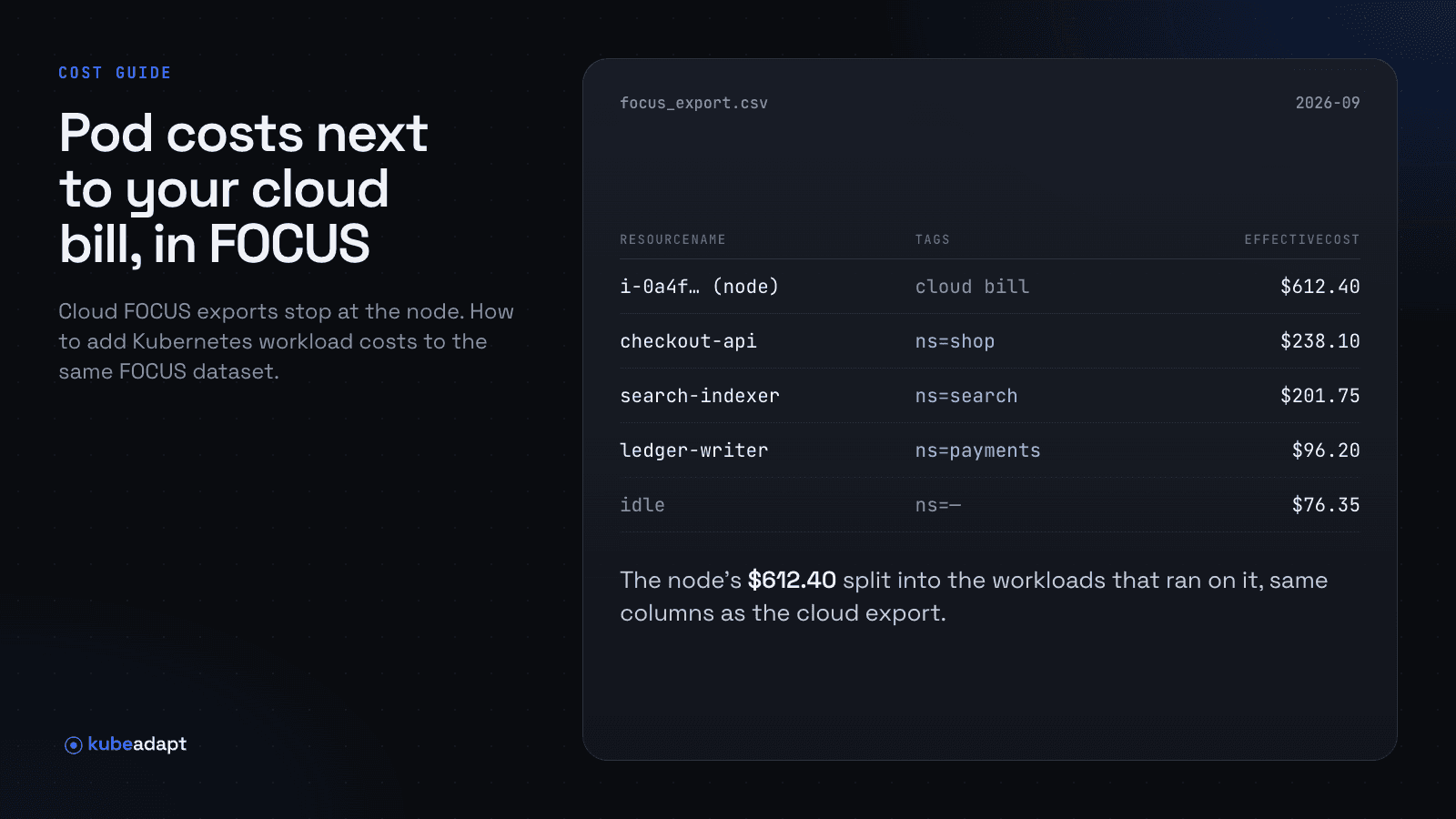
A provider's FOCUS export describes what the provider sold you: instances, volumes, load balancers, data transfer. For a Kubernetes cluster that means rows for nodes, not for the workloads on them. The m6i.4xlarge row is there; which of its forty pods spent it isn't.
To get Kubernetes into the same FOCUS table, you need a second source that has already allocated each node's cost to workloads, and that writes its result in FOCUS. Then the two can sit side by side:
- Provider rows for everything outside Kubernetes, and for the cluster as infrastructure.
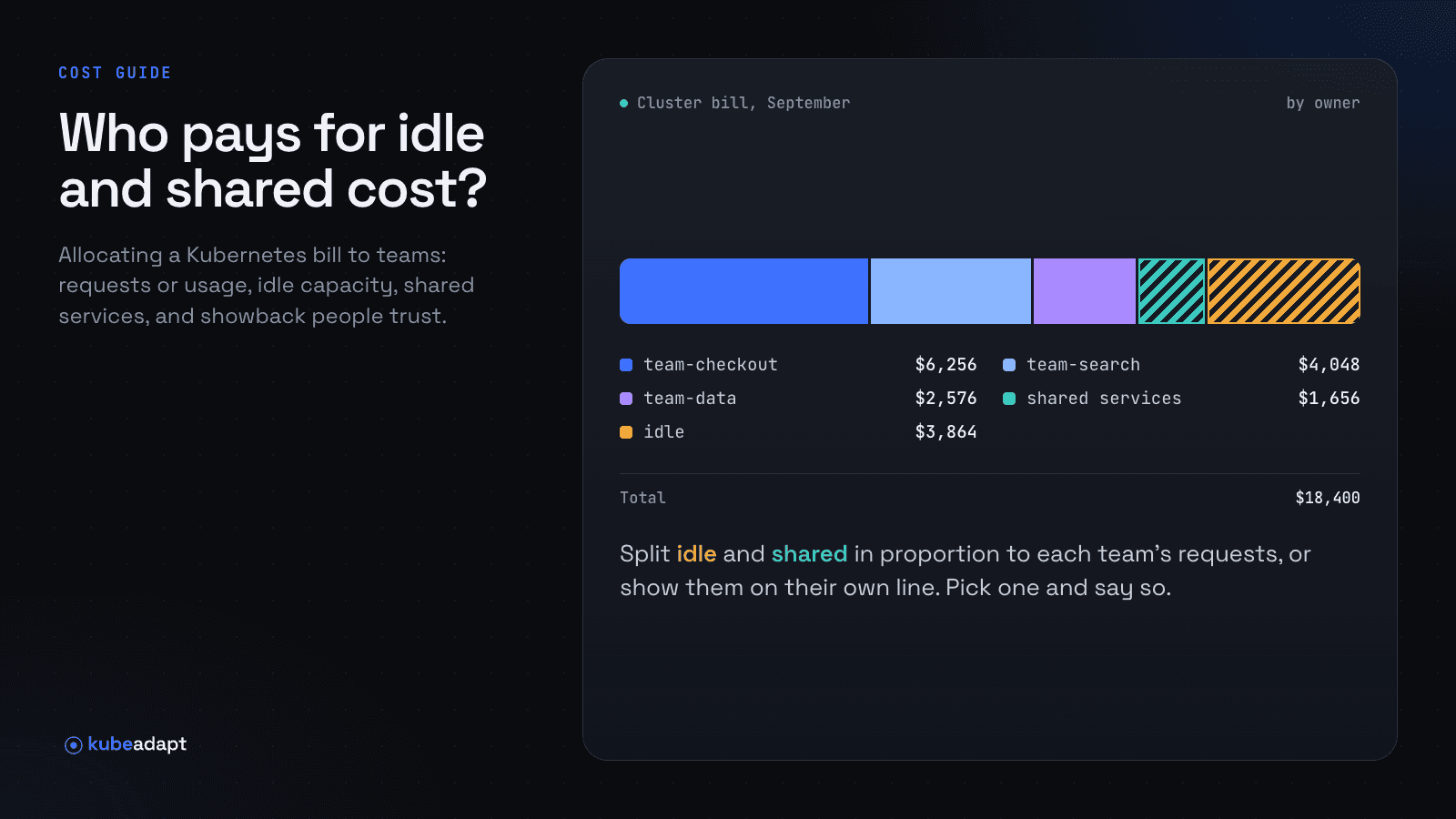
- Kubernetes rows for the same cluster, broken down by workload or namespace, with idle capacity either on its own rows or spread across the workloads.
Combining them without double counting
The cluster's nodes appear in both datasets: once as provider infrastructure and once split into workloads. Decide which one your reports use for Kubernetes:
- Totals and invoices: use the provider rows. They're the bill.
- Team and workload views: use the Kubernetes rows, and filter the provider rows for the same nodes out of those views, using the cluster's tags or resource IDs.
- Keep idle visible. If your Kubernetes export keeps idle capacity on separate rows, the platform team can see and own it. Spreading it makes every team's number add up to the total.
- Expect a difference. A usage-based Kubernetes allocation priced from rates will not match the invoice to the cent. Discounts, credits and anything the allocation doesn't price account for the gap. Report it rather than hide it.
What to check in a Kubernetes FOCUS export
- Version and completeness. Which FOCUS version it follows, and how you know a download finished.
- Grain. Workload or namespace rows, and per cluster.
- Idle and shared cost. Separate rows, or apportioned.
- Columns. The cost columns your warehouse expects, plus tags that carry team and environment.
- Automation. An API you can call from a scheduled job, not only a download button.
How Kubeadapt exports FOCUS
Kubeadapt writes Kubernetes cost as a FOCUS 1.4 cost and usage file:
- Where to get it. From Cost Explorer's Export menu (CSV or Parquet) or from the public API (CSV, JSON Lines or Parquet), for any window and any set of clusters.
- Grain. One row per workload or per namespace.
- Idle capacity. Kept on its own rows, or apportioned to the workloads that used each node.
- Completeness. The API reports whether each download completed, so scheduled loads can retry a partial file.
Costs are computed from usage and prices as documented in how costs are computed; they are not reconciled against your invoice, which is why the provider's own FOCUS rows stay the source of truth for totals. The exports reference lists every parameter.
See also: Kubernetes cost allocation, and get started.
Sources
- FinOps Foundation: FOCUS specification
- Linux Foundation: FOCUS 1.3 launch (2025-12-11)
- AWS: Data Exports for FOCUS 1.0 generally available (2024-11-25)
- AWS: Data Exports for FOCUS 1.2 (2025-11-19)
- Microsoft: Cost Management exports, including FOCUS
- Google Cloud: Export billing data to BigQuery in FOCUS
- Oracle: FOCUS support for OCI cost reports (2024-06-05)