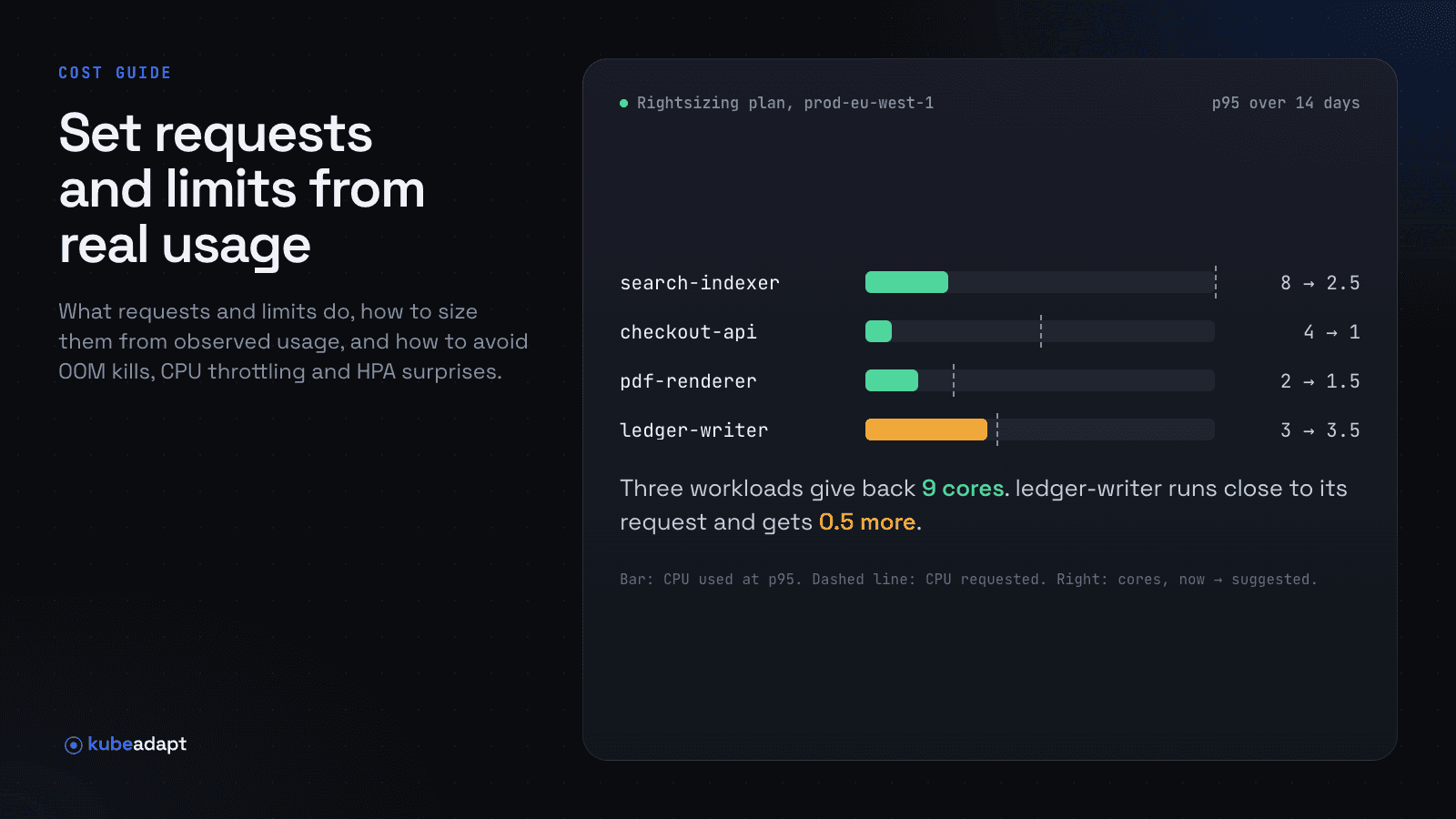
In most clusters, the biggest cost lever isn't the instance type or the discount plan. It's the CPU and memory requests on each workload. Requests are what the scheduler reserves, so they decide how many nodes you need. They are also usually set once, by guesswork, and never revisited. This guide explains what requests and limits actually do, and how to set them from measured usage without causing outages.
What requests and limits do
Requests are a reservation. The scheduler places a pod only on a node with enough unreserved capacity for its requests, and the capacity stays reserved while the pod runs, whether or not it's used. Requests are therefore what your node count, and your bill, follow.
Limits are a ceiling, and the two resources behave differently when a container hits it:
- Memory limit. A container that tries to use more memory than its limit is killed by the kernel (
OOMKilled) and restarted. Memory can't be taken back from a running process, so the ceiling is enforced by killing it. - CPU limit. A container that uses its CPU limit is throttled: the kernel stops scheduling it for the rest of each enforcement period. Nothing crashes, but latency rises, often in ways that look like an application problem.
Quality of service classes
Requests and limits together set a pod's quality of service class, which decides who gets evicted first when a node runs short of memory:
- Guaranteed: every container has CPU and memory requests equal to its limits. Evicted last.
- Burstable: at least one container has a request or limit, but it isn't Guaranteed.
- BestEffort: no requests or limits at all. Evicted first. It also costs nothing under a requests-based cost model, which is one reason to require requests everywhere.
Choosing requests from usage
Set requests from what the workload actually uses, over a window that covers its normal cycle (at least a week for anything with daily or weekly patterns):
- CPU request: a high percentile of usage (P90 to P99, depending on how latency-sensitive the service is), plus headroom for growth. CPU is compressible: if a container briefly needs more than its request and the node has room, it gets it.
- Memory request: close to the peak, because memory isn't compressible. Use a high percentile (P99) or the observed maximum, plus headroom.
- Per container, not per pod. Sidecars have their own usage. Size each container separately.
- Per environment. Production deserves more headroom than a staging copy that idles most of the day.
- Busy replicas, not averages. For StatefulSets and sharded services, size for the busiest pod. Replicas of the same workload can use very different amounts.
Choosing limits
Limits are a policy choice as much as a sizing one:
- Memory limit: keep one, set above the observed peak with a margin. It protects the node from a leak. If a container is OOM-killed, raise both request and limit before anything else, and look at the peak that caused it.
- CPU limit: many teams set none, or set it well above the request, to avoid throttling, and rely on requests for fair sharing. Others need hard CPU limits for multi-tenant isolation or Guaranteed QoS. Either is defensible; what isn't is a CPU limit equal to an under-sized request on a latency-sensitive service.
Autoscalers
- Horizontal Pod Autoscaler. HPA usually scales on utilization as a percentage of the request. Lower a CPU request by half and the same load reads as twice the utilization, so the HPA may add replicas and the saving disappears. Recompute the HPA target, or the minimum replica count, in the same change.
- Vertical Pod Autoscaler. VPA isn't part of core Kubernetes; you install it separately. It recommends requests from usage and, in its update modes, applies them, by recreating pods or, where supported, resizing them in place. Don't run VPA in an update mode on resources an HPA also scales on. VPA in recommendation-only mode is a good, free source of numbers to review.
- In-place resize. Kubernetes can change a running container's CPU and memory without recreating the pod. The feature was alpha in 1.27, beta and on by default in 1.33, and stable in 1.35. It doesn't cover init containers, doesn't change a pod's QoS class, and a resize can be deferred when the node lacks room. See the resize documentation.
A safe process
- Measure. Collect per-container usage for at least a week.
- Pick the candidates. Look for large, steady gaps between request and usage, sorted by cost. A few workloads usually hold most of the saving.
- Change one workload at a time, through your normal deployment process: a pull request with the new values, reviewed by the owning team.
- Watch restarts, OOM kills, throttling and latency for a few days after each change, and adjust.
- Repeat monthly. Usage drifts with every release.
How Kubeadapt does it
Kubeadapt's rightsizing recommends requests and limits per container:
- Inputs. A week of minute-level usage, a high percentile chosen per environment, and growth and spike buffers.
- Limits. Memory limits come from the observed peak plus headroom, and memory is raised after OOM kills.
- Autoscalers. It takes HPAs into account, so a request cut doesn't trigger a scale-up that cancels the saving.
- Output. Each recommendation shows its saving and a YAML patch to apply through your own review.
Nothing is ever applied for you. The method is in the rightsizing docs, and recommendations appear after about seven days of data. Get started.