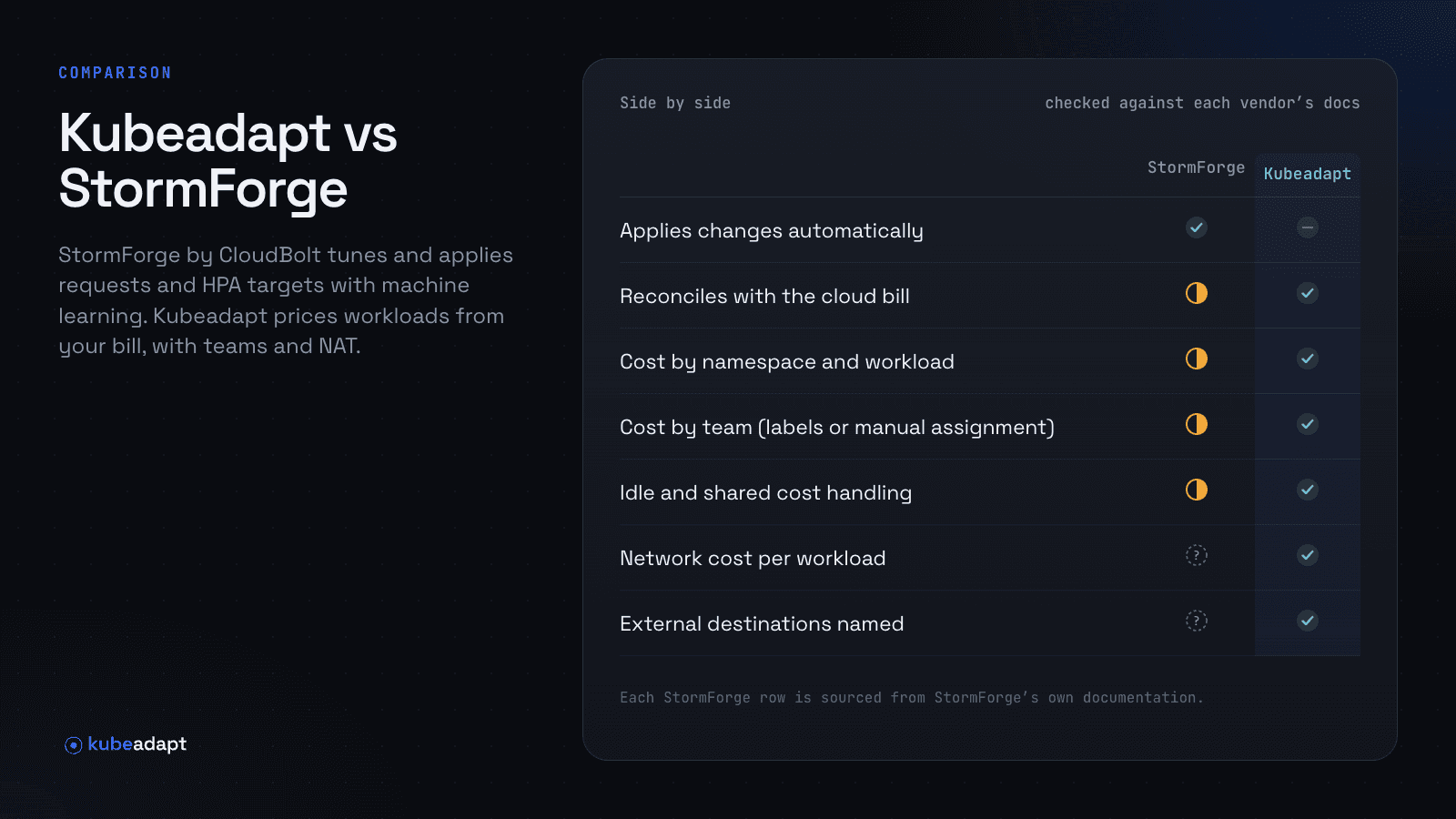
StormForge, part of CloudBolt since March 2025, uses machine learning to set CPU and memory requests, limits and HPA target utilization for each container, and its Applier rolls the changes out automatically or on demand, in place on Kubernetes 1.33 and later. Its own screens price a recommendation with CPU and memory rates you enter in Settings; allocating the cluster bill to namespaces and teams happens in the CloudBolt Platform from a FOCUS export. Kubeadapt recommends requests and does not apply them. It prices each container from its node and your bill, splits it across teams, and measures its cross-zone and NAT gateway traffic with eBPF.
The short version
StormForge goes further than Kubeadapt on requests: it tunes HPA targets as well and applies the result, while Kubeadapt recommends and your team ships the YAML. Kubeadapt goes further on cost, in one product. Savings are priced from the node each container runs on and, once you connect CUR 2.0 or the Azure or Google Cloud billing export, from what you were billed. Shared workloads split across up to 10 teams, NAT gateway and cross-zone traffic is priced per workload, spikes are caught against a baseline learned by hour of day, and finance receives an Executive report on a schedule. StormForge is the right fit when you want requests and HPA targets tuned continuously and applied through Argo CD or Flux, and when CloudBolt already runs your cost platform.
Side by side
| StormForge | Kubeadapt | |
|---|---|---|
| Rightsizing recommendations | Yesmachine-learned, plus Java heap | Yesrequests and limits, as YAML |
| HPA-aware rightsizing | Yesalso sets HPA target utilization | Yes |
| Applies changes automatically | YesApplier, in place on 1.33+ | Norecommends only |
| Node autoscaling or bin-packing | Partlynode affinity for tighter packing | No |
| Reconciles with the cloud bill | PartlyGPU spend; full bill in CloudBolt | YesAWS, Azure, Google Cloud |
| Cost by namespace and workload | Partlyestimate from rates you enter | Yesdown to the container, per minute |
| Cost by team (labels or manual assignment) | Partlyin the CloudBolt Platform | Yeslabels or manual, with splits |
| Idle and shared cost handling | Partlyin the CloudBolt Platform | Yesidle shown separately |
| Network cost per workload | Not documented | YeseBPF, measured per pod |
| External destinations named | Not documented | Yesfrom DNS |
| Cost spike alerts | Not documented | Yeslearned baselines |
| Scheduled PDF reports | Not documented | Yes |
| Commitment management (Savings Plans, RIs, CUDs) | PartlyRI and Savings Plan benefits shown | Yescoverage, utilization, expiries |
| GPU cost and utilization | Yesuse, waste and billed GPU spend | Yes |
| MCP server for AI tools | Yeshosted; write tools off by default | Yeshosted, read-only |
| Runs without a Prometheus server | PartlyForwarder runs the Prometheus image | Yes |
Checked against StormForge's documentation and CloudBolt's release notes on November 19, 2026. "Not documented" means we could not find it there.
Pricing a recommendation from the bill
StormForge's workload page shows estimated monthly cost from two numbers you type in Settings: a CPU cost per hour and a memory cost per hour. Set $0.031 per vCPU-hour (an example rate) and a recommendation that frees 40 vCPU of requests reads as $905 a month: 40 × $0.031 × 730 hours. That figure is the same whether the freed capacity sat on spot nodes, on nodes covered by a Compute Savings Plan, or on on-demand nodes. The invoice treats each of those differently, and finance will ask which one it was.
Kubeadapt charges each container the greater of its request and its usage, every minute, priced from the node it runs on. Connect the AWS Cost and Usage Report (CUR 2.0), Azure Cost Management exports or the Google Cloud billing export, and Savings Plans, Reserved Instances, committed use discounts, spot prices, negotiated discounts and credits land on the workload that used them, so the saving next to the YAML patch is priced the way the bill priced that node. Commitment Manager shows, through coverage and utilization, whether the hours you free were on-demand spend or commitment you pay for regardless, and sizes the next commitment from the steady baseline you run after rightsizing. The method is in how costs are computed.
CloudBolt offers bill-level allocation in the CloudBolt Platform, fed by a FOCUS export, and since November 2026 StormForge allocates billed GPU spend itself. For CPU and memory, StormForge on its own prices the saving at the rate you typed.
The NAT gateway line next to a well-tuned workload
Say StormForge keeps an ingest-worker Deployment well sized. Every hour it reads Parquet files from S3 in the same region through the cluster's NAT gateway, about 50,000 GB a month (an example volume). AWS charges $0.045 per GB processed by a NAT gateway in us-east-1, including traffic to S3 in the same region: $2,250 a month. An S3 gateway endpoint costs $0. No request or HPA change touches that line, and the AWS bill shows it on the NAT gateway, never on the pod.
Kubeadapt's optional eBPF agent counts traffic at each pod's own network interface on Linux kernel 5.10 or newer. In Network Intelligence, Destinations names external services from DNS, so the line reads ingest-worker to S3 through NAT, with its bytes and dollars. The fix is a route table entry for the gateway endpoint, and the next week's figure shows whether it worked. Kubeadapt counts the node's own traffic too, so image pulls and kubelet traffic leaving through the same NAT gateway are on the screen as well. The NAT gateway guide covers the endpoint setup step by step.
Cost per team for the quarterly review
The quarterly review asks a question no request recommendation answers: why did checkout cost more in Q3 than in Q2? Answering it needs cost by team, shared workloads split fairly, idle cost kept apart, and a report someone outside engineering can read.
In Kubeadapt, teams and departments come from labels or the assignment workbench, and one workload can be split across up to 10 teams. Cost Explorer drills from cluster to container for any team and period and exports PDF or JSON. The Executive report gives managers and finance the spend, the change, its drivers and cost by team in 5 pages; the Engineering report covers workloads, rightsizing, nodes, network and dated savings in 6 to 13. Both go out once or on a schedule by email and Slack. Between reports, Smart Alerting watches budget thresholds per cluster, namespace, team or department, and flags cost spikes against a range learned from each scope's history by hour of day, so the nightly batch run does not page anyone.
Follow-up questions go to Kubeadapt AI in the app, which answers with charts from your cluster data, or to Kubeadapt MCP from Claude Code, Cursor or ChatGPT: one hosted URL, 23 read-only tools, OAuth sign-in with SSO. StormForge's hosted MCP server covers clusters, namespaces, workloads and recommendations, and adds apply and create tools an administrator can turn on.
Where StormForge is stronger
- It manages the HPA as well as the request. When StormForge changes requests it also sets HPA target utilization, so the workload keeps scaling at the same load, and it writes to KEDA ScaledObject triggers. Per workload you can preserve the scale point or ignore the HPA. Kubeadapt accounts for an HPA when it recommends CPU but does not change the HPA.
- It rolls changes out for you. The Applier deploys recommendations on a schedule in incremental steps (a daily schedule spreads one change over four days), in place on Kubernetes 1.33 and later, with guides for Argo CD and Flux. Kubeadapt does not apply changes; your team ships each patch.
- It optimizes GPU nodes. GPU optimization has been generally available since November 10, 2026: StormForge shows GPU use and waste per workload, recommends better-fit GPU node types, and allocates billed GPU spend to namespaces, workloads and labels, including on shared and time-sliced GPUs.
Running both
Install the Kubeadapt Helm chart next to the StormForge Agent and Applier; cost per workload appears in about 5 minutes and rightsizing recommendations after about 7 days. Workloads that StormForge already tunes will show small or no Kubeadapt recommendations; leave those to StormForge. For workloads outside its scope, a Kubeadapt recommendation changes nothing until your team applies the patch. In week one, set StormForge's estimated monthly cost per workload beside Kubeadapt's: the gap comes from one rate for every node against the price of the node each container ran on, and from requests alone against the greater of request and usage. Connect your billing export and schedule the first Executive report for month end.
Install Kubeadapt next to StormForge on one cluster, or book a demo to see a workload priced from your own bill.
Sources
- CloudBolt: CloudBolt acquires StormForge (2025-03-31)
- CloudBolt: GPU optimization in StormForge generally available (2026-11-10)
- StormForge: What's new
- StormForge: Requests and limits recommendations
- StormForge: HPA settings
- StormForge: Apply settings
- StormForge: View recommendations
- StormForge: Pod scheduling recommendations
- StormForge: Kubernetes cost allocation
- StormForge: Connect AI agents with MCP
- StormForge: Forwarder configuration
- StormForge: Configure Applier alerts
- Kubeadapt: How costs are computed
- Kubeadapt: eBPF agent