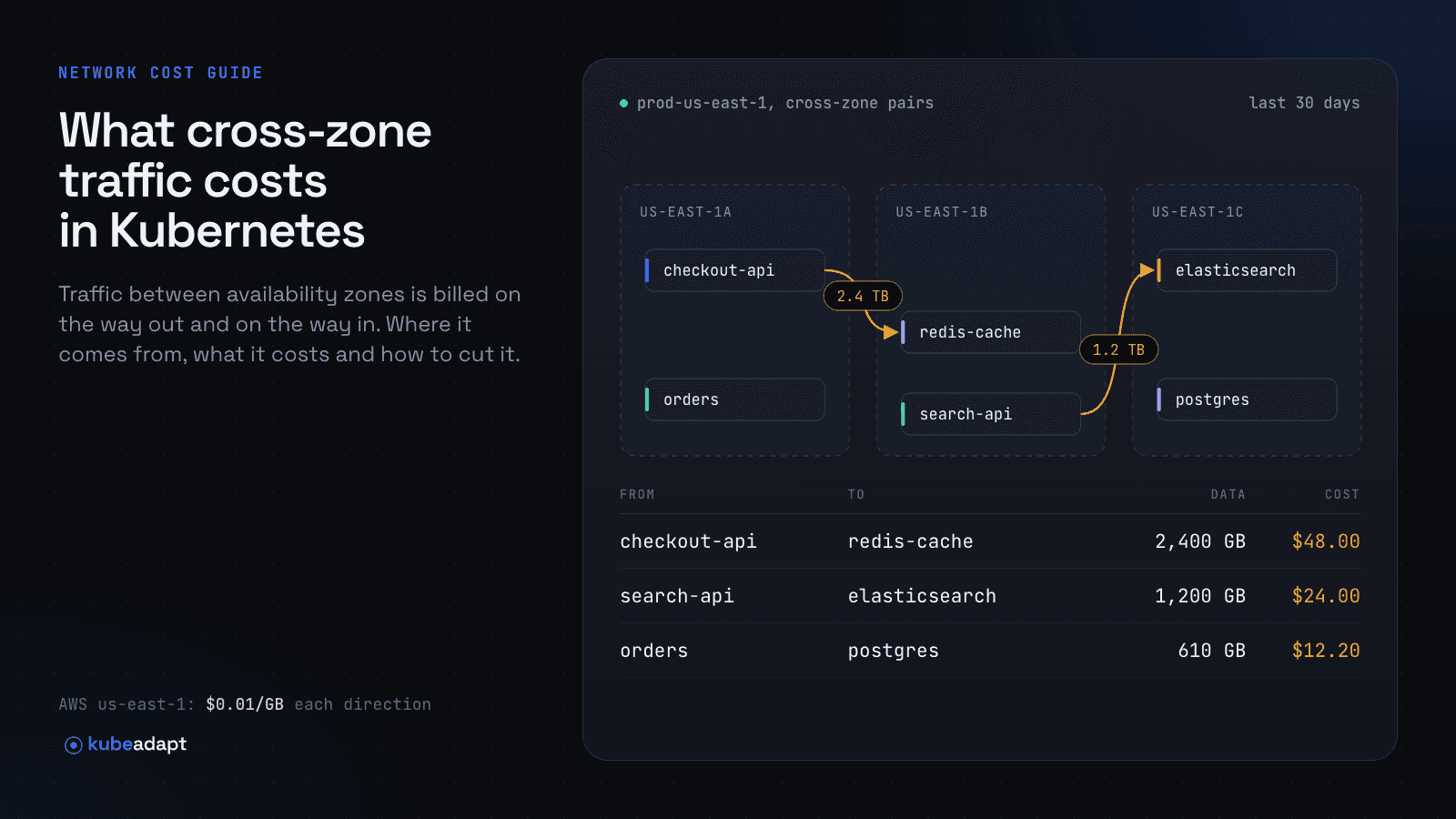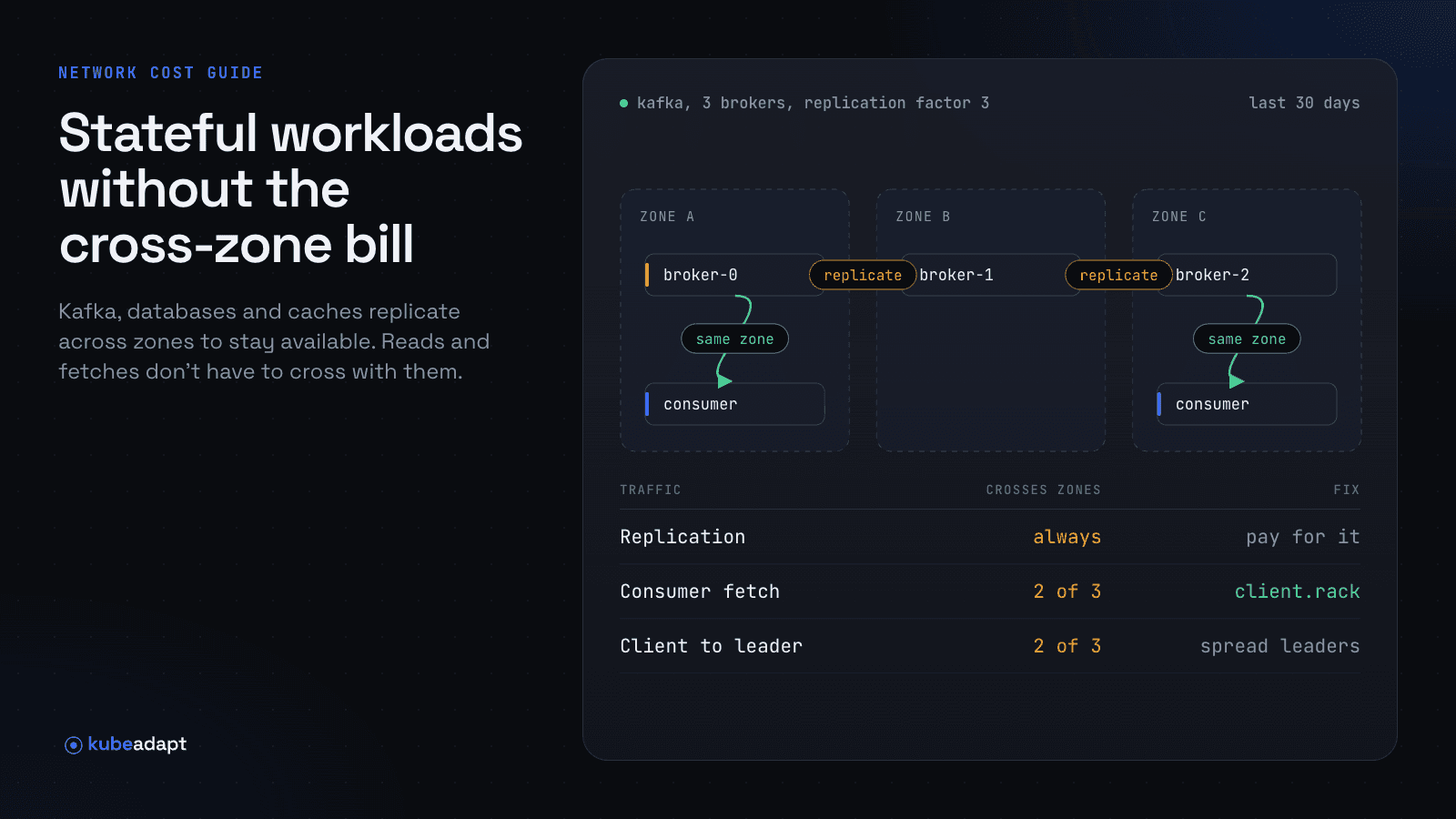
Kafka, PostgreSQL, Redis and Elasticsearch copy every write to other zones so they survive losing one. That traffic crosses zones on purpose, and it is worth what it costs. Their reads usually cross too, to a leader or primary in another zone, even when a copy of the data sits in the reader's own zone. Those reads are the part you can cut.
Which traffic to keep and which to cut
| Traffic | Examples | Cut it? |
|---|---|---|
| Replication of writes | Kafka followers, PostgreSQL standbys, Elasticsearch replica shards | No. It protects you from losing a zone |
| Writes from clients | Kafka producers, writes to a database primary | Only where the system supports it, such as Kafka producers since 4.4 |
| Reads from clients | Kafka consumers, read queries, cache gets, searches | Yes. A copy in the same zone can usually serve them |
Managed services take part of this off the bill. Amazon MSK doesn't bill replication between brokers, so only client traffic adds to the data transfer line. ElastiCache bills only your application's side of a connection that crosses zones. Self-managed systems on Kubernetes pay for every byte. Azure stopped charging between zones in 2024; the cross-AZ data transfer guide covers the other clouds.
Kafka consumers: read from the replica in their zone
A Kafka consumer reads each partition from its leader, wherever that leader runs. With three brokers, one per zone, two of every three leaders sit in another zone. Yet with a replication factor of three, every broker holds a copy of every partition. Follower fetching, from KIP-392 and in Apache Kafka since 2.4.0, lets the consumer read from the copy in its own zone.
Where Kafka consumers read from
Three brokers, one per zone, with every partition copied to all three. Each dot is one fetch.
Animated diagram of three zones, each with two consumer pods and one broker. Reading from the leader, about two of every three fetches go to a broker in another zone; fetching from the closest replica, every fetch stays in its own zone.
It takes three settings: broker.rack on every broker, replica.selector.class set to RackAwareReplicaSelector, and client.rack on every consumer. With Strimzi 1.3.1, the rack section sets broker.rack from the node's zone label, and the selector goes in config:
1apiVersion: kafka.strimzi.io/v1
2kind: Kafka
3metadata:
4  name: my-cluster
5spec:
6  kafka:
7    rack:
8      type: topology-label
9      topologyKey: topology.kubernetes.io/zone
10    config:
11      replica.selector.class: org.apache.kafka.common.replica.RackAwareReplicaSelector
Your own consumers need client.rack set to their zone. From Kubernetes 1.35, the PodTopologyLabels admission plugin copies the node's zone label onto each pod, so the Downward API can pass it in:
1apiVersion: apps/v1
2kind: Deployment
3metadata:
4  name: orders-consumer
5spec:
6  template:
7    spec:
8      containers:
9        - name: consumer
10          image: registry.example.com/orders-consumer:1.8.0
11          env:
12            - name: KAFKA_CLIENT_RACK
13              valueFrom:
14                fieldRef:
15                  fieldPath: metadata.labels['topology.kubernetes.io/zone']
Map it to client.rack in your application. On older clusters, read the node label in an init container.
What can go wrong
If client.rack is empty or doesn't match broker.rack exactly, the consumer reads from the leader without an error, and only the traffic shows it. Reads also cross again while a broker restarts or its copy falls behind. Follower fetching may add latency too, because followers hear about new messages after the leader.
Consumer placement now decides which broker serves the reads:
Share of reads each broker serves
Example: half the consumers run in us-east-1a, 30% in us-east-1b and 20% in us-east-1c. The dashed line is an even share for three brokers. Spreading consumers evenly over the zones keeps the brokers level.
Bar chart of three brokers. Reading from leaders spread evenly, each broker serves about a third of the reads. With follower fetching, the broker in us-east-1a serves half of them, the broker in us-east-1b 30% and the broker in us-east-1c 20%.
Kafka producers: rack-aware partitioning
Producers write each record to its partition leader, so they cross zones the same way. Apache Kafka 4.4.0 (October 2026) adds rack-aware partitioning from KIP-1123: the producer prefers partitions whose leader runs in its own zone.
client.rack=us-east-1a
partitioner.rack.aware=true
# Applies to records the partitioner places itself: no key, or
# every record when partitioner.ignore.keys=true
It only applies to records the producer places itself: records without a key, or all records with partitioner.ignore.keys=true, which gives up keeping each key on one partition. It is a setting of the Java producer. KIP-1123 also warns that producers must be spread fairly evenly, because with producers in only two zones the third zone's partitions receive nothing.
What the two fixes save
Take an example cluster with one broker per zone and 10 TB a month produced, which three consumer groups each read in full. At the AWS rate of $0.02 per GB that crosses (us-east-1, November 2026), it pays for three flows:
| Flow | Cost today | With both fixes |
|---|---|---|
| Producers to partition leaders | $133 | $67, if half the records have no key |
| Replication to two followers | $400 | $400 |
| Consumers reading from leaders | $400 | about $0 |
| Total per month | $933 | $467 |
Follower fetching does most of the work, and replication doesn't move: it is what keeps a zone failure from losing data. Each consumer group added later without client.rack costs another $133 a month here.
Database reads from a replica in the same zone
Keep replication across zones and send read-only queries to an instance in the client's zone. With CloudNativePG 1.30, spread the instances over zones and add a read Service that prefers the same zone:
1apiVersion: postgresql.cnpg.io/v1
2kind: Cluster
3metadata:
4  name: orders-db
5spec:
6  instances: 3
7  affinity:
8    topologyKey: topology.kubernetes.io/zone
9    podAntiAffinityType: required
10  postgresql:
11    synchronous:
12      method: any
13      number: 1
14      dataDurability: required
15  managed:
16    services:
17      additional:
18        - selectorType: r
19          serviceTemplate:
20            metadata:
21              name: orders-db-r-local
22            spec:
23              trafficDistribution: PreferSameZone
24  storage:
25    size: 100Gi
The read Service uses selectorType: r, which includes the primary. The default -ro Service covers only replicas, so with three instances in three zones the primary's zone has no replica to read from. On Kubernetes 1.31 to 1.33, write PreferClose (see topology-aware routing).
Replicas lag the primary, so reads that must see the last write stay on the -rw Service. With dataDurability: required, writes pause when no synchronous standby is available; two standbys let you lose a zone without that.
Redis and Valkey: read from the replica in your zone
Put a replica in each zone and use a client that reads from the one in its own zone. Valkey GLIDE calls this AZ affinity. It relies on the availability-zone setting added in Valkey 8, which you set on each node when you run Valkey yourself.
1import os
2from glide import GlideClusterClientConfiguration, NodeAddress, ReadFrom
3
4client_config = GlideClusterClientConfiguration(
5    [NodeAddress("valkey-cluster.cache.svc", 6379)],
6    read_from=ReadFrom.AZ_AFFINITY,
7    client_az=os.environ["POD_ZONE"],  # topology.kubernetes.io/zone via the Downward API
8)
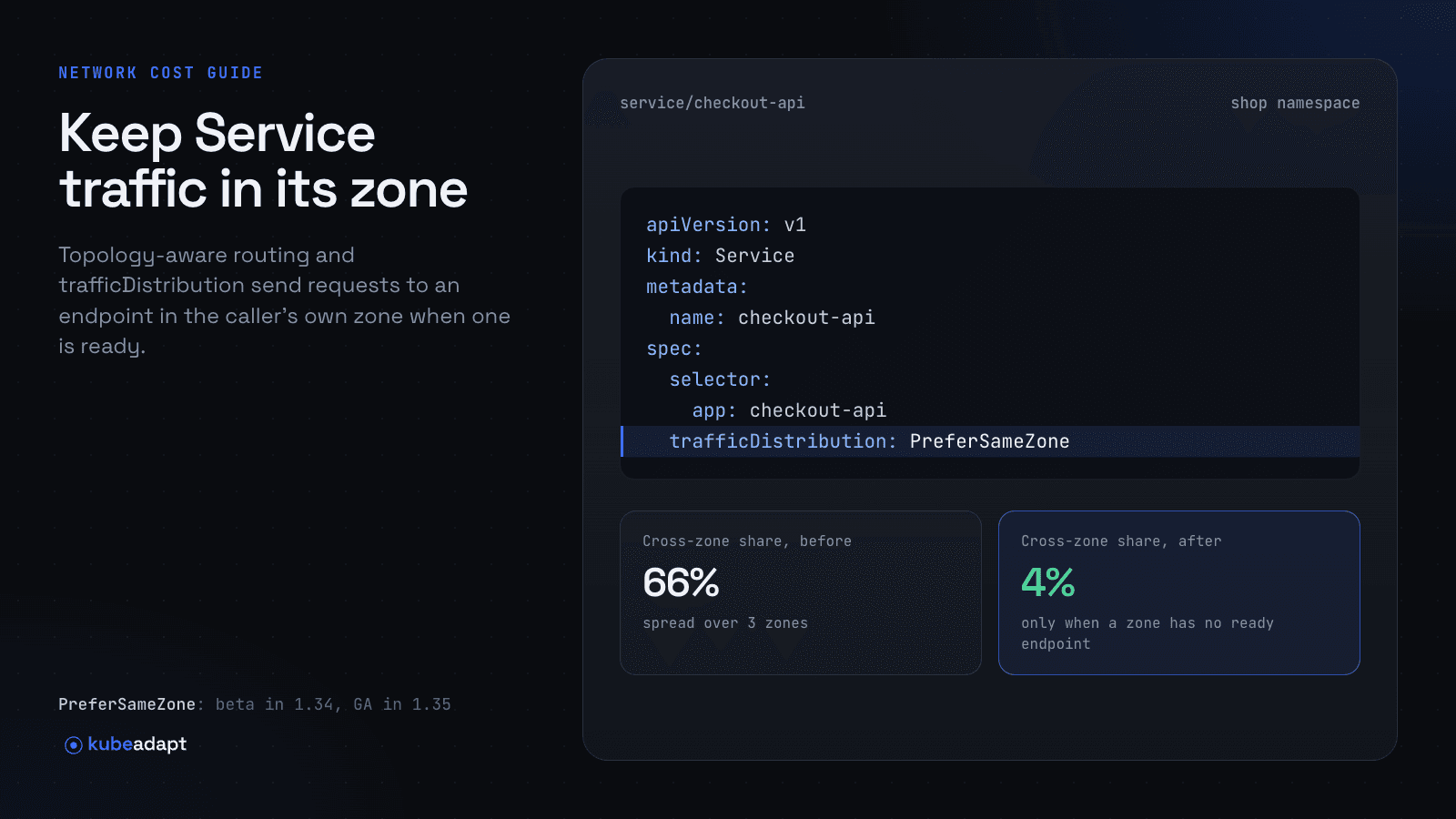
The zone the client passes must match the one the server reports. Replica reads can be slightly stale, so keep reads that must see the last write on the primary. For a cache behind a plain Service, trafficDistribution: PreferSameNode or PreferSameZone does the same job without client changes.
Elasticsearch and OpenSearch
Use shard allocation awareness so a shard and its replica never share a zone, and keep searches on a node in the client's zone. On Elastic Cloud on Kubernetes, zoneAwareness sets this up:
1apiVersion: elasticsearch.k8s.elastic.co/v1
2kind: Elasticsearch
3metadata:
4  name: logs
5spec:
6  version: 9.5.6
7  nodeSets:
8    - name: default
9      count: 6
10      zoneAwareness: {}
Turn it on for every NodeSet at once, since adding it restarts all of them. A client Service with trafficDistribution: PreferSameZone then keeps the first hop local. In OpenSearch, the search preference _local runs on local shard copies where it can, and its docs warn that this can create hotspots.
Volumes that pin a pod to its zone
An EBS volume only attaches to an instance in its own zone, so a pod that claims one is scheduled there. Disk traffic never crosses a zone. The pod can never move to follow its callers, though, and if its zone fails, it waits until the zone comes back.
WaitForFirstConsumer creates each volume only after its pod is scheduled:
1apiVersion: storage.k8s.io/v1
2kind: StorageClass
3metadata:
4  name: gp3-zonal
5provisioner: ebs.csi.aws.com
6volumeBindingMode: WaitForFirstConsumer
7parameters:
8  type: gp3
9  csi.storage.k8s.io/fstype: xfs
With the default Immediate mode, a volume can land in a zone where the pod's spread constraint won't let it run, and the pod never starts. Set the zone spread constraint on the StatefulSet before its first rollout, since changing it later doesn't move existing volumes.
Seeing which consumer or reader crosses zones
Kafka clients connect straight to broker pods, and replicas stream from their primary by pod address, so none of it passes through a Service. The bill never names the pod either. Finding the reader that crosses takes traffic measured per workload; measuring cross-AZ traffic per workload compares the methods.
Kubeadapt's network agent counts bytes at each pod's own network interface and keeps the real pod address on both ends. In Network Intelligence, Explorer lists each workload pair with its zones, bytes and cost, most expensive first, priced at AWS or Azure rates or your own rate card. A consumer group without client.rack stands out next to the groups already reading locally. For reads through a Service, Network Intelligence names the Services that would save money with topology-aware routing.
Kubeadapt doesn't change your cluster; your team makes the change. With Kubeadapt MCP in Claude Code, ask which workloads read from brokers in another zone and what each costs, and Claude Code can add client.rack to those manifests in a pull request you review. Afterwards, Explorer shows whether those pairs stopped crossing, and a cost spike alert on the namespace flags it if a new consumer group ships without client.rack.
Before you enable the network agent
The network agent requires a chart version later than 1.0.8. Do not enable it with chart version 1.0.8 or earlier on a cluster that enforces network policy. The agent docs list its requirements.
Install the agent with the quick start, or book a demo to see Network Intelligence on a running cluster.
Sources
- Amazon EC2 On-Demand Pricing: Data Transfer within the same AWS Region
- Amazon MSK pricing
- Amazon ElastiCache pricing
- KIP-392: Allow consumers to fetch from closest replica
- KAFKA-8443: Allow broker to select a preferred read replica for consumer (fix version 2.4.0)
- KIP-1123: Rack-aware partitioning for Kafka Producer
- KAFKA-19193: Rack-aware partitioning for Kafka Producer (fix version 4.4.0)
- Apache Kafka downloads (4.4.0 released October 22, 2026)
- Apache Kafka 4.4 producer configs (partitioner.rack.aware, client.rack)
- Apache Kafka 4.4 broker configs (broker.rack, replica.selector.class)
- Apache Kafka 4.4 consumer configs (client.rack)
- Strimzi 1.3.1: Configuring (rack awareness, consuming from the closest replicas)
- Kubernetes: Admission controllers (PodTopologyLabels)
- Kubernetes: Service traffic distribution
- CloudNativePG 1.30: Replication
- CloudNativePG 1.30: Service management
- CloudNativePG 1.30: Scheduling
- CloudNativePG 1.30: API reference (ServiceSelectorType)
- Valkey GLIDE: Specify a read strategy
- Valkey blog: AZ affinity strategy
- Elasticsearch: Shard allocation awareness
- Elastic Cloud on Kubernetes: Advanced Elasticsearch node scheduling (zoneAwareness)
- Elasticsearch: Search shard routing
- OpenSearch: Search shard routing
- Kubernetes: Storage classes (volume binding mode)
- Kubernetes: Running in multiple zones (storage access for zones)
- Amazon EBS volumes
- Amazon EBS CSI driver: StorageClass parameters and topologies