
Cost questions rarely arrive at a convenient moment. A product manager asks in Slack why the staging cluster costs as much as production. A pull request doubles a Deployment's memory request and nobody checks what that does to the bill. Finance wants the monthly numbers by team before Friday. Each answer is in Kubeadapt, but getting it means stopping what you are doing, opening a dashboard and translating what you see back into the conversation.
Most of those conversations now happen next to an AI tool: Claude or ChatGPT in a browser tab, Cursor or VS Code in the editor, Claude Code or Codex in the terminal. Today we're launching Kubeadapt MCP, which lets those tools answer cost questions themselves, from your Kubeadapt data.
What it looks like
Ask in your own words. For example:
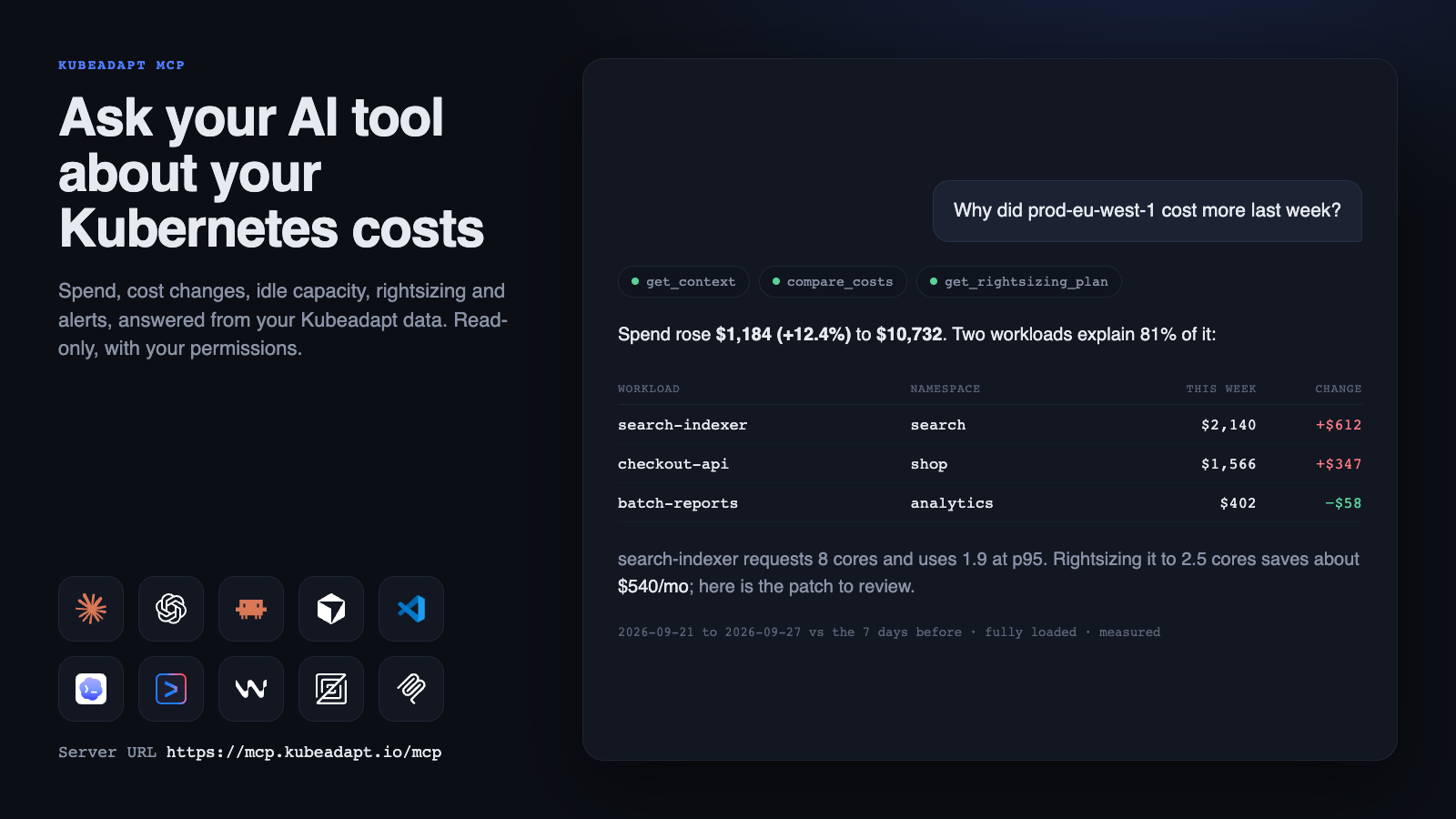
Why did prod-eu-west-1 cost more last week?
Your AI tool finds the cluster, compares the two weeks and answers with the figures: spend rose $1,184 (12.4%), two workloads explain 81% of it, and the larger one requests 8 cores while using 1.9 at the 95th percentile. Ask for the fix, and it fetches the rightsizing plan, with the recommended requests and limits and a YAML patch, and in an editor it can propose the change to your manifest for you to review.
A few more questions it handles well:
- How much of this month's bill is idle capacity that no workload requested?
- What did each team cost in September, and which workloads still have no team?
- Which of our clusters are priced with default rates instead of our real prices?
- Are we close to any budget? What fired this week, and is the cost change real?
- What does cross-zone traffic cost us, and which services cause it?
Works with the tools you use
Kubeadapt MCP is a remote server for the Model Context Protocol, the open standard AI tools use to connect to outside data. You add one URL and sign in with your Kubeadapt account. There are no API keys to create or paste.
https://mcp.kubeadapt.io/mcp- Claude: add a custom connector on the web or in Claude Desktop, on any plan.
- ChatGPT: add Kubeadapt as an app in developer mode.
- Claude Code: one
claude mcp addcommand, then sign in from/mcp. - Cursor and VS Code: one-click install.
- Codex, Gemini CLI, Windsurf and Zed: a command or a few lines of configuration.
- Any other MCP client that supports remote servers.


What your AI tool can reach
Kubeadapt MCP has 23 tools across four kinds of data:
- Costs and carbon: spend by cluster, namespace, workload, node, pod, container, team, department or label; daily, weekly and monthly trends with a month-end estimate; comparisons between two periods; the rates each cluster is priced with; persistent volumes; and carbon emissions.
- Savings: rightsizing, spot, abandoned-workload and orphaned-resource recommendations; per-workload plans with a patch to review; capacity and headroom; node utilization; CPU and memory history with the busiest hour of the day; and a recommended node layout with what-if estimates for spot, node count and ARM instances.
- Alerts: incidents with their findings and cost impact, and the rules and budgets behind them.
- Network costs: traffic cost by billing class, the workloads that send most, internet destinations, and the workload pairs that cross zones.
It also ships six ready-made prompts: a weekly cost review, explaining a cost change, explaining a cluster's bill, finding idle spend, rightsizing a namespace and triaging an incident.
Numbers you can quote
An AI tool is only as useful as the numbers it repeats, so we spent most of our time on what each answer says about itself.
Every answer carries its time window, its cost mode, and whether the figures were measured from usage, estimated, still arriving, partial or from a cluster that stopped reporting. AI tools are told to repeat that context, so "we spent $4,149" arrives as "$4,149 from July 1 to September 29, fully loaded, measured".
Missing data is reported as missing. If a cluster runs no network monitoring, the answer says its traffic is unknown rather than zero. If a cluster is priced with Kubeadapt's default rates because nobody entered its real prices, the pricing answer says so first, because every total that follows depends on it. And when you ask how much is idle, cost answers split the bill into what workloads use, the idle capacity no workload requested, and shared costs such as storage and the management fee.
Before launch we asked it the questions customers ask us, and checked the answers against kubectl on a live cluster: workload, pod and container counts, CPU and memory requests, memory use, persistent volume sizes and node facts all matched. Each time it got something wrong, we fixed the tool before shipping it.
Read-only, with your permissions
Kubeadapt MCP never changes anything. No tool writes to Kubeadapt or reaches your clusters; rightsizing patches are proposals that go through your own review and deployment process.
When you connect, you sign in on Kubeadapt's own page, SSO included, and choose what the AI tool may read: which kinds of data, and either all the clusters you can see or specific ones. The connection can never see more than you can in Kubeadapt, and it follows changes to your role and groups. Text from your clusters, such as workload names and labels, is passed to the AI tool as data, never as instructions, and answers never include tokens, keys or notification settings.
Every tool call is recorded. Under Settings → Kubeadapt MCP you can see your connections and their activity and end any of them. Admins see the whole organization, choose which kinds of data AI tools may reach and whether only verified AI tools may connect, and set how long a connection lasts before people sign in again.
Get started
Kubeadapt MCP is included in every plan, and every member of your organization can connect. Open Connect your AI tool, pick your tool, and you'll be asking your first question in about a minute. What you can ask has a list of questions to start with.
New to Kubeadapt? Start free: install the agent, and your AI tool can answer for your clusters within the hour.